
Picking an AI tool for your company used to be simple. Now it's not.
There are hundreds of tools on the market. The big platforms, ChatGPT, Gemini, Claude, Copilot, ship new features every few weeks. Your CRM has added AI. So has your email client, your design software, your video conferencing platform. Every vendor is claiming their tool will change how your team works. And every few months, something new arrives that apparently changes everything again.
In the middle of all this, someone at your company has been asked to make a decision.
This post focuses on the four general-purpose AI assistants that most companies are choosing between: ChatGPT, Claude, Gemini, and Copilot. Tools that can help almost anyone on your team with almost any task, writing, research, analysis, brainstorming, summarising, translating. If you want a broader framework for thinking about your entire AI tool stack, including when specialised tools make sense, we cover that in our AI Strategy Guide.
ChatGPT, Claude, Gemini, and Copilot are all capable. They are all improving fast. And the gap between them on any specific feature can close within months. So the decision is less about which tool is technically best right now, and more about which one fits the way your team already works.
We've trained over 12,000 professionals on AI across industries and we work hands-on with all four of these tools. Here is what we have learned.
ChatGPT is the tool that started the current wave of AI adoption, and it remains the most feature-rich all-rounder on the market.
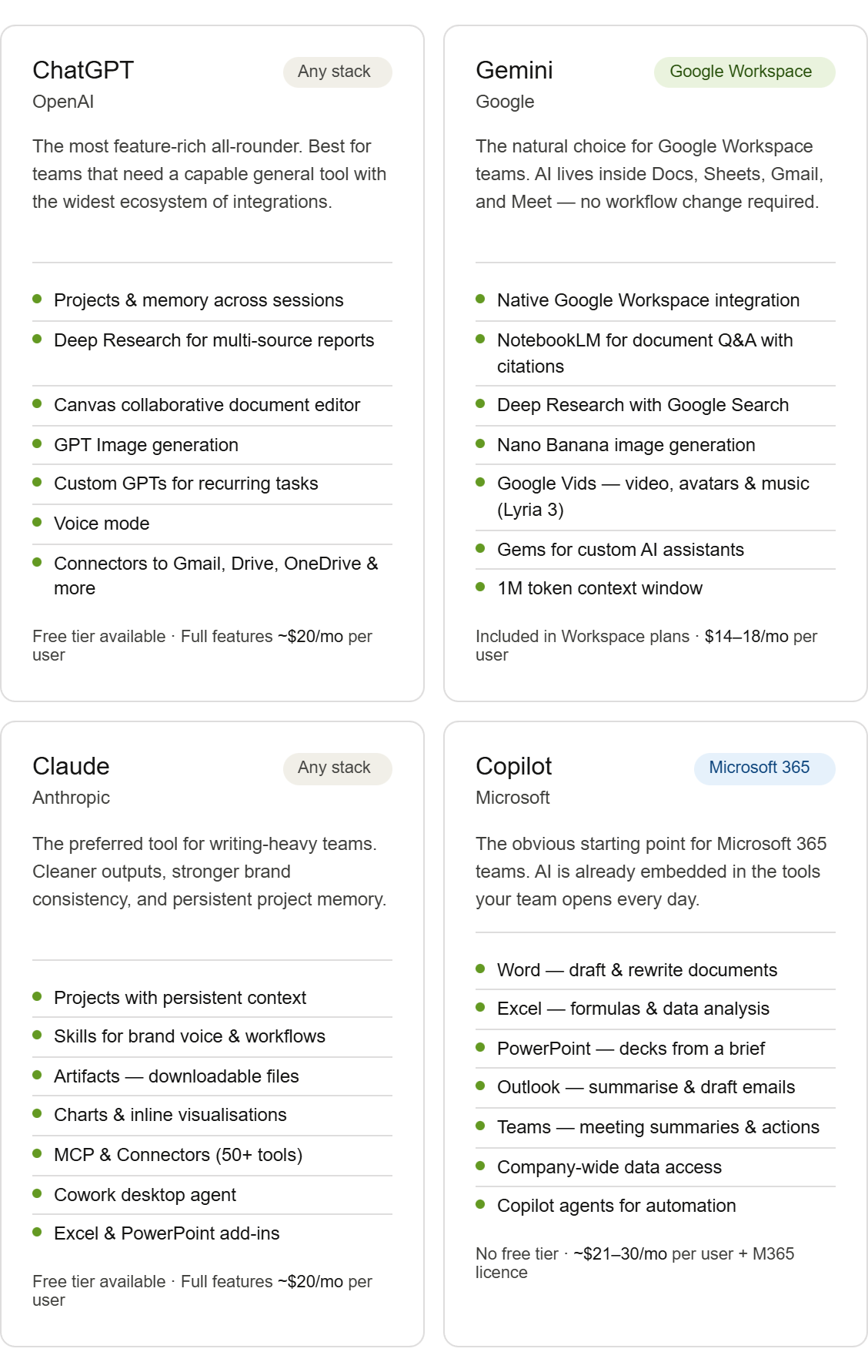
Projects and memory let you organise conversations by topic and have the tool remember your preferences over time, so you are not re-explaining context every session. Deep Research compresses hours of multi-source web research into structured reports in minutes, useful for market analysis, competitor research, or due diligence. Canvas lets you draft and edit documents, proposals, and reports directly alongside the AI, rather than copying text back and forth. GPT Image generates images directly in chat, handy for presentations, social content, or quick visual mockups. Custom GPTs let you build personalised AI assistants tailored to specific recurring tasks your team does regularly. Voice mode allows real-time spoken conversations with the AI, useful when you are on the move or prefer not to type. And connectors link ChatGPT directly to Gmail, Google Drive, OneDrive, SharePoint, Dropbox, and other tools, allowing it to search and reference your files and emails without manual copy-pasting.
ChatGPT is the safest default for most companies. It has the widest feature set, the largest ecosystem of integrations, and the longest track record of adoption, which makes onboarding easier because most people have already encountered it. Free tier available, with full features requiring ChatGPT Plus or Team at around $20 per user per month.
Gemini's biggest advantage is where it lives: inside Google Workspace. If your team runs on Docs, Sheets, Gmail, and Meet, Gemini adds AI to the workflow your team already has rather than asking people to change how they work.
Google Workspace integration means AI can summarise emails, draft documents, and generate charts in Drive without switching tabs. NotebookLM lets you upload reports, contracts, research papers, or meeting transcripts and ask questions across all of them at once, getting cited answers drawn directly from your own documents rather than the general internet. Deep Research synthesises information from multiple web sources into structured reports. Nano Banana is Google's native image generation model, built into Gemini, letting you create and edit visuals through natural language conversation. Gemini also supports video generation through Vids, and music creation through Lyria 3, which can generate short tracks from a text prompt, an image, or a video clip. And Gems let you build personalised AI assistants for recurring tasks, similar to Custom GPTs in ChatGPT.
Gemini also supports an exceptionally large context window, meaning it can process and reason across very long documents in a single session. In practice, this means a team could upload a full contract, a lengthy board report, or months of meeting transcripts and ask questions across all of it at once without the tool losing track of earlier content.
Gemini is the right choice when your organisation runs on Google and you want AI adoption to happen with the least possible friction. For business users, Gemini is included in all Google Workspace Business and Enterprise plans, starting at around $14 to $18 per user per month depending on the plan, with no separate AI add-on required.
Claude is the tool that people who write a lot tend to prefer. It produces clean, nuanced text that requires less editing, and handles long, complex documents particularly well.
Projects are persistent workspaces that hold reference documents, custom instructions, and grouped conversations, so Claude knows your context every time you open a project without you having to re-explain it. Useful for teams that work on the same clients, campaigns, or projects repeatedly. Skills let you encode how your team works, your brand voice, your report format, your preferred structure, so Claude applies them automatically without being prompted each time. Artifacts turn Claude's outputs into actual downloadable files, documents, presentations, and spreadsheets you can use directly. Claude can also generate charts, diagrams, and inline visualisations directly in its responses, useful when you need to present data or communicate complex information clearly without switching to a separate tool. MCP and Connectors link Claude to Slack, Gmail, Google Drive, Notion, and 50+ other tools. And Cowork is a desktop feature that lets Claude autonomously complete multi-step tasks on your behalf, such as drafting a report, creating a formatted presentation, and saving it to the right folder, all from a single instruction.
Claude is also available directly inside Microsoft Excel and PowerPoint through official add-ins, which means Microsoft 365 users are not limited to Copilot when it comes to AI assistance in Office apps.
Claude is the right choice when writing quality and brand consistency matter most, or when your team produces a high volume of client-facing content that currently requires significant editing. That gap compounds over time. Free tier available, with full features requiring Claude Pro or Team starting at around $20 per user per month.
Copilot is Microsoft's AI, and its primary strength is deep integration with Microsoft 365. If your company runs on Word, Excel, PowerPoint, Outlook, and Teams, Copilot lives inside those tools already.
In Outlook, it summarises long email threads and drafts replies based on your tone and context. In Teams, it catches you up on meetings you missed, pulls out the key decisions, and lists the action items so you don't have to re-watch recordings. In Word, it drafts documents from a brief or rewrites existing sections. In Excel, it analyses data, spots trends, and suggests formulas in plain language. In PowerPoint, it builds a full slide deck from a short prompt or a document you already have. Copilot also connects to your organisation's internal data, meaning it can reference documents, emails, and files from across your company's systems, not just what you paste into the chat. This is one of Copilot's most distinctive advantages for larger organisations: it knows what is already in your environment.
The honest caveat: Copilot is often the default choice for Microsoft-heavy organisations not because it is the most capable tool in a vacuum, but because it is already there. That is a legitimate reason to start with it. But if your team's primary needs are open-ended writing, strategy, or research work rather than Office-embedded tasks, it is worth testing it against Claude or ChatGPT before committing at scale.
No meaningful free tier for business use. Copilot requires a Microsoft 365 licence plus a Copilot add-on, starting at around $21 per user per month for smaller organisations.
The single biggest driver of AI adoption is not capability. It is friction. A tool that lives inside the apps your team already uses will get used. A tool that requires opening a new tab, logging into a separate platform, and copying output back into your actual work will not, at least not consistently.
If your team is on Google Workspace, start with Gemini. If your team is on Microsoft 365, start with Copilot. If neither applies clearly, move to the next considerations.
Beyond the platform, think about how deeply AI needs to fit into specific workflows. A sales team that lives in email and CRM has different needs to a strategy team that produces long-form reports. Copilot and Gemini both offer deep native integration into their respective ecosystems, making them ideal when the work happens primarily inside a single platform. Claude and ChatGPT connect more broadly across tools and workflows, which makes them better suited to teams whose work spans multiple systems or does not fit neatly inside one platform.
Adoption is where most AI initiatives fail. The tool that your team finds most intuitive and most relevant to their daily work is the right tool, regardless of which one scores highest on a benchmark. ChatGPT has an advantage here simply because most people have already used it. Copilot and Gemini benefit from appearing inside tools people already open every day. The best predictor of adoption is relevance: when someone sees immediately that a tool saves them time on work they actually do, they use it. When it feels like extra effort, they don't.
This is the question IT will ask first, and rightly so. If your team handles sensitive client data, regulated information, or anything subject to GDPR or industry-specific compliance, this needs to be resolved before any tool goes into wide use. A marketing agency has different requirements to a law firm or a financial services company. All four tools have enterprise plans with stronger data protections, but the defaults vary and configuration requires attention. Do not skip this step, and make sure IT is part of the decision from the start, not brought in after the fact.
Finally, what does your team actually spend most of its time doing? Research-heavy teams get the most from ChatGPT's Deep Research or Gemini's NotebookLM. Writing-heavy teams tend to prefer Claude for the quality of its outputs. Teams spending most of their time in meetings and email tend to benefit most from Copilot's Teams and Outlook integration. And teams that produce a lot of branded content, proposals, or client-facing materials will find Claude's Skills feature particularly useful for maintaining consistency at scale. Map your highest-volume tasks to the tools that handle them best, and let that guide the decision.
No single tool wins across every use case, and none of them will stay still. All four are shipping new features regularly, and the gap between them on any specific capability can close quickly. The decision you make today is not permanent.
What matters most is picking one, making it your team's primary tool, and building real habits around it for at least a few months. A team that uses the same tool consistently, shares what works, and develops a common workflow will outperform a team where everyone uses something different, every time.
Our suggestion: match the tool to your existing stack first. Run a structured pilot with a small group before rolling out to the whole team. Measure what changes. Then expand. The goal is not a team that has access to AI. It is a team that uses it confidently, every day, as a natural part of how work gets done.
At AI Academy, we've helped over 12,000 professionals and teams go from knowing AI exists to actually using it reliably in their daily work. We work hands-on with all four tools covered in this post, ChatGPT, Claude, Gemini, and Copilot, so our training is grounded in how these tools actually perform in real work contexts, not just what the product pages say.
Whether your team is just getting started or looking to go deeper, we'd love to help.
Explore AI Academy Corporate Training and get a programme tailored to your team's tools, workflows, and goals. We work with organisations to build real AI fluency, not just awareness.
Is one AI tool objectively better than the others?
No. Each has genuine strengths in specific contexts. The more useful question is which one fits best into how your team already works, and which one your team will actually use consistently.
We already have Microsoft 365 Copilot. Should we still consider other tools?
Yes. Copilot excels at tasks embedded inside Office apps, but for more open-ended work like writing, research, or strategy, other tools may produce better results. We usually recommend testing before committing at scale.
How do we get our team to actually use AI consistently?
This is the hardest part, and it has less to do with the tool and more to do with habit-building, shared workflows, and practical training. It is exactly what our corporate programmes are designed to address.
Can we try these tools before committing to a paid plan?
Yes. ChatGPT, Gemini, and Claude all offer free tiers that give you enough to pilot with a small group. Copilot is the exception, as meaningful business use requires a paid Microsoft 365 licence with the Copilot add-on.
What about data privacy and security?
All four tools have enterprise plans with stronger data protections, but the defaults vary. If your team handles sensitive client data or operates in a regulated industry, this needs to be addressed before wide adoption. We cover data governance as part of our corporate training programmes.
Who should make this decision inside our company?
Ideally a small group: someone from IT or operations who understands security and procurement, and one or two people from the teams who will use it most. Avoid leaving it to individuals or pushing it top-down without user input. Both tend to result in low adoption.
How much does it cost?
ChatGPT and Claude cost around $20 per user per month. Gemini is bundled into Google Workspace plans at $14 to $18 per user per month. Copilot starts at around $21 per user per month, on top of an existing Microsoft 365 licence.
Do these tools keep getting better?
Yes, significantly and frequently. All four release new features every few weeks. This is one reason not to overthink the initial decision: the tool you choose today will be meaningfully different in six months, and most improvements happen automatically for existing users.
How long does it take to see real productivity gains?
Most teams start seeing meaningful efficiency improvements within the first month of consistent, structured use. The key word is structured. Unsupported adoption tends to stall after the initial enthusiasm fades.
What if our team has mixed levels of AI experience?
That is almost always the case. The best training meets people where they are rather than assuming a baseline. Our corporate approach is built around this reality.


.png)
.png)