
Think about what your team actually spends time on when using AI tools: re-explaining context at the start of every conversation, reformatting outputs that came back in the wrong structure, chasing down which version of the prompt is correct, checking whether a new team member is prompting the same way as everyone else.
None of that is the AI working for you. That is you working around the AI.
The fix is not a better prompt. It is a better setup. That is what Claude Skills are for.
Claude Skills are reusable sets of instructions that teach Claude how to handle a specific task or workflow. Instead of explaining your process every conversation, you write it down once and Claude applies it automatically whenever that task comes up.
Skills come in three types. Anthropic Skills are built-in and automatic, covering tasks like creating Excel, Word, and PDF files with no setup required. Partner Skills come from the Skills Directory, built by companies like Notion, Figma, and Atlassian. Custom Skills are ones you or your organization build for your own workflows and standards.
This blog focuses on Custom Skills, since that is where most business teams will spend their time and get the most value. Custom skills work at two levels: individuals can build personal workflows that only they use, things like a note-taking format or a writing style, and organizations can build shared skills that apply across the whole team. On Team and Enterprise plans, an admin can also provision skills workspace-wide so every team member has access automatically, with no individual setup required.
You can manage all your skills in one place: Customize > Skills.
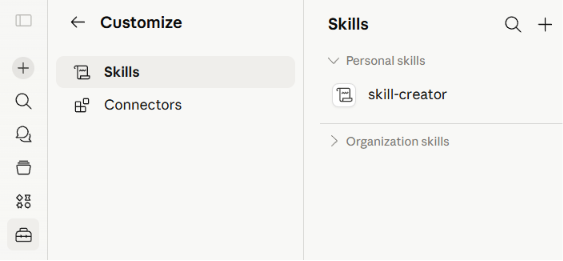
Skills work across Claude.ai, Claude Code, and the API without modification. You can invoke a skill directly by typing /skill-name in the chat, but you do not have to. Claude reads your prompt and decides on its own whether a skill is relevant. If you ask for a client proposal and you have a proposal skill uploaded, Claude loads it automatically without you having to do anything.
You can have multiple skills uploaded at the same time and Claude figures out which ones to apply based on what you are asking. It only loads what is needed for the task at hand, so having many skills uploaded does not slow things down or overload the context. For example, when you ask Claude to "draft a follow-up email after today's client call," it recognizes that both the brand voice skill and the meeting follow-up skill are relevant and applies both automatically. You do not have to tell it which ones to use, and you do not need one giant skill that tries to cover everything.
In practice, skills solve three problems that affect almost every team using AI.
Inconsistency. When different people prompt differently, they get different results. A skill means the same process runs regardless of who triggers it. A junior team member gets the same output quality as your most experienced person.
Onboarding time. New team members do not need to learn how your team uses AI. They just use the skill. The knowledge is in the system, not in someone's memory.
Process drift. When a process lives in a prompt doc, it gets updated inconsistently. When it lives in a skill, there is one version, and whoever owns it keeps it current.
Not every task needs a skill. A good rule of thumb: if someone on your team has to explain the same context to Claude more than once a week, that context belongs in a skill.
A skill is worth building when:
The task is repeated across the team. If multiple people are doing the same type of work with Claude and each one is writing similar instructions at the start of every conversation, you are wasting time and getting inconsistent results.
The output quality varies too much. When different people get different results from Claude for the same task, it usually means the instructions are inconsistent. A skill standardizes the input so the output is more reliable.
There are rules Claude needs to follow every time. Some tasks come with non-negotiables: a specific format, a brand voice, a required structure, a list of topics to avoid. These belong in a skill, not in someone's memory.
The task requires company-specific knowledge. Claude does not know your internal processes, your product names, or how your team categorizes things. If that context is needed every time, put it in a skill.
A skill is probably not worth building when the task is genuinely one-off, when the process changes every few weeks, or when a short prompt already handles it reliably. If a two-sentence prompt gives you what you need every time, leave it as it is. And resist the urge to build many skills at once. One skill your whole team uses every day is worth more than ten that nobody remembers are there.
The easiest way to find your first skill is to look for the task where your team is most inconsistent. Not the most complex task, not the most important one. The one where two people doing the same job produce noticeably different outputs.
Ask yourself three questions:
Does this happen at least weekly? If the task is monthly or ad hoc, the investment in building and maintaining a skill rarely pays off.
Would a new team member struggle to match the quality of your best person? If yes, the process lives in someone's head rather than somewhere useful. That is exactly what a skill is for.
Can you describe what good looks like in plain language? If you cannot write down the inputs and the expected output clearly, the skill will not work well either. Use this as a forcing function. If you cannot define the standard, the process itself needs work before you encode it.
If all three answers are yes, you have found your first skill.
List every task your team does more than once a week that involves writing, summarizing, formatting, or following a process. Score each one on two axes: how often it happens, and how much quality varies across the team. The task that scores highest on both is where to start.
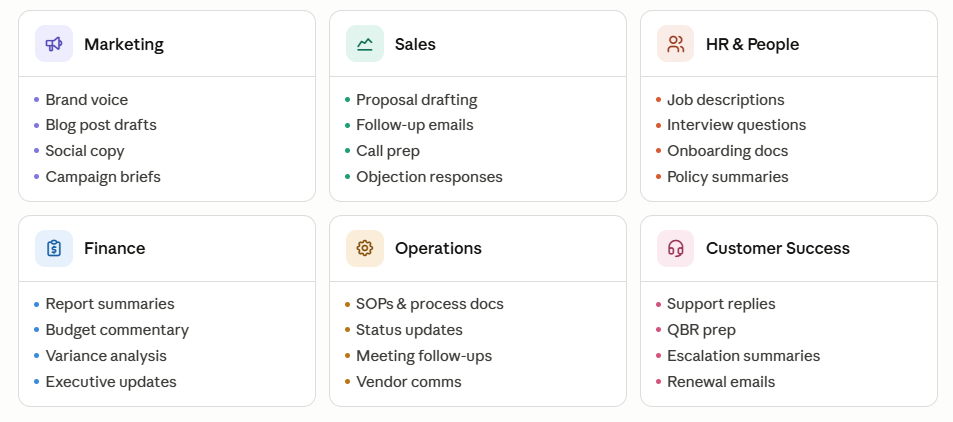
Here are some ideas by department to get you started.
Before you start, make sure code execution is enabled in your Claude settings. It is required for skills to work. All three creation options live in the same place: Customize > Skills, click the + button.
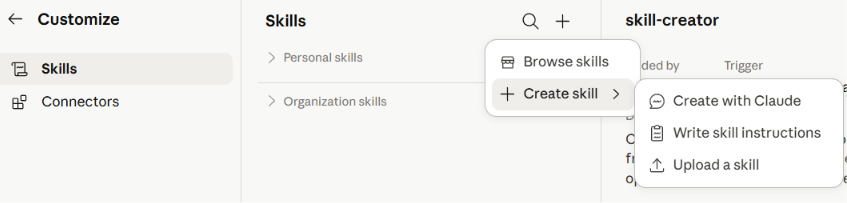
Option 1: Create with Claude (recommended)
Type /skill-creator directly in the chat, or select "Create with Claude" from the + menu. You can also type: "Use the skill-creator skill to help me build a skill for [your workflow]"
The skill-creator asks you a few questions about your workflow: what the skill should do, when it should trigger, and what format the output should follow. Answer in plain language. Once it has enough to work with, it generates the skill, shows you a summary of what it does, and gives you a "Save skill" button to install it directly from the conversation.

Before hitting Save, ask Claude "When would you use this skill?" to verify the trigger is right. If it is off, ask it to refine before saving. Most first skills take 15 to 30 minutes this way.
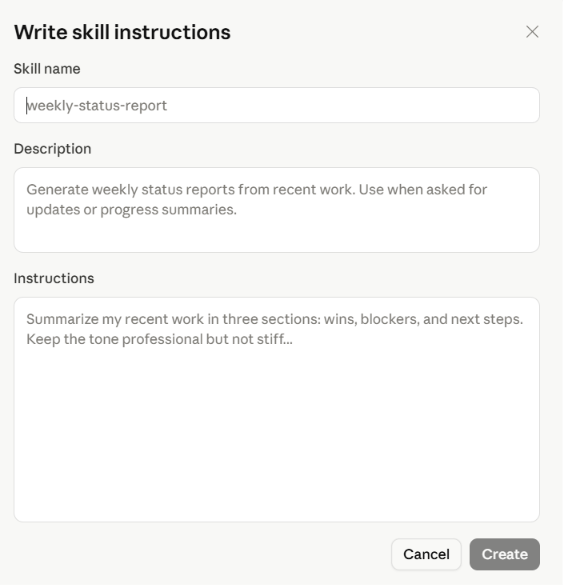
Option 2: Write skill instructions
Select "Write skill instructions" from the + menu. A simple form opens with three fields: name, description, and instructions. Fill them in and click Create. Good for when you know exactly what you want and prefer to write it directly.
Option 3: Upload a skill file
Select "Upload a skill" to import an existing skill file, whether you built it yourself outside Claude, a colleague shared it, or you downloaded it from a repository. You can upload a single .md file, or a .zip or .skill file that includes a Skill.md file. We walk through this process step by step in the brand voice example below.
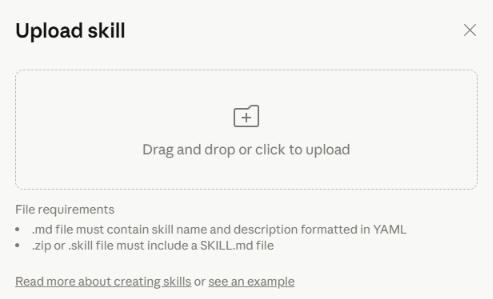
Skills can also go beyond a single instructions file. You can include reference documents Claude loads when needed, and scripts for more advanced workflows like data analysis or report generation. For most teams, the instructions alone are enough.
Brand voice is one of the most common first skills teams build. Every team member who writes anything client-facing needs to sound like the same company. Without a skill, that consistency depends on someone catching tone issues in review. With a skill, Claude applies the guidelines before the first draft exists.
Here is a ready-to-use template you can upload directly. Copy it, fill in your details, and follow the steps below.
---
name: brand-voice
description: Applies [Your Company] brand voice and tone guidelines
when writing or editing any content. Use when asked to write emails,
social posts, blog content, proposals, or any external-facing
communication. Also triggers on phrases like "write in our tone,"
"make this sound like us," or "apply our brand voice."
metadata:
author: Your Company
---
# Brand Voice Skill
## What This Skill Does
Applies [Your Company] brand voice to any written content. Use it
whenever writing or reviewing anything seen by clients, prospects,
or the public.
## Our Brand Voice
**Tone:** [e.g. Direct and confident, but never arrogant. Warm
without being informal. We write like a knowledgeable colleague,
not a salesperson.]
**We always:**
- Use short sentences and short paragraphs
- Lead with the most important point
- Write in active voice
- Use "we" and "you," not third person
- Back claims with specifics, not adjectives
**We never:**
- Use filler words: "very," "really," "quite," "just"
- Use buzzwords: "leverage," "synergy," "robust," "seamless"
- Open with "In today's [anything]..."
- Write sentences longer than 25 words without good reason
**Words we use:** [e.g. straightforward, practical, clear, results]
**Words we avoid:** [e.g. cutting-edge, revolutionary, transformative]
## Tone by Content Type
**Emails:** State the purpose in the first sentence. No lengthy
preambles. Concise and direct.
**Social posts:** One idea per post. Conversational but professional.
End with a clear point, not a question.
**Blog posts:** Informative and practical. Use subheadings every
2-3 paragraphs. No jargon without explanation.
**Proposals:** Clear and confident. Focus on outcomes, not features.
Use the client's language where possible.
## How to Apply This Skill
When writing new content:
1. Identify the audience and content type
2. Draft using the voice guidelines above
3. Remove any filler, passive voice, or buzzwords
4. Check that the first sentence earns the reader's attention
When reviewing existing content:
1. Flag anything that violates the voice guidelines
2. Suggest specific rewrites, not just comments
3. Explain briefly why each change improves the content
## Output Format
Deliver the final content ready to use. If reviewing, deliver a
revised version plus a short list of the main changes made and why.
Step 1: Fill in the template. Replace all placeholder text in square brackets with your actual guidelines.
Step 2: Save the file. Open any text editor, paste the content, and save it as exactly Skill.md (not .txt or .docx). Put it inside a folder named brand-voice and compress the folder into a ZIP file, making sure the folder is at the root of the ZIP.
Step 3: Upload to Claude. Go to Customize > Skills, click +, select "Upload a skill," and upload the ZIP.
Step 4: Enable the skill. Once uploaded, toggle it on in Customize > Skills before using it.
Once the skill is working for one content type, add more format-specific sections over time. Start with the content type your team produces most often and expand from there.
On Team and Enterprise plans, if you want the skill available to everyone without each person uploading it individually, go to Organization settings > Skills and click "+ Add." Upload the file there and it is automatically provisioned to all users. Members can still toggle it off individually if they choose.
A skill is only as good as the instructions inside it. If your processes change, your brand voice evolves, or Claude keeps making the same mistake, the skill needs updating.
Assign ownership. Someone on the team should be responsible for reviewing each skill every quarter and updating it when something changes. Think of it the same way you would treat an internal wiki. If nobody owns it, it slowly becomes inaccurate and people stop trusting it.
Skills are not a one-time setup project. They are something you build gradually, refine as your processes evolve, and expand as your team's confidence grows. The teams that get the most out of them treat them like any other operational asset: with clear ownership, regular review, and a bias toward keeping things simple.
Want help designing the right Claude setup for your team? AI Academy's corporate training programs help business teams move from scattered AI experiments to consistent, well-structured workflows. We cover tool selection, skill design, and practical implementation across functions.
Get in touch to learn more about corporate training.
What is a Claude Skill?
A reusable set of instructions that teaches Claude how to complete a specific task or workflow. You write them in plain language, Claude loads them automatically when relevant, and team members can also invoke them directly by typing /skill-name in the chat.
How are Skills different from custom instructions or Projects?
Custom instructions apply broadly to all conversations. Projects provide always-on background knowledge for a specific shared space. Skills are task-specific and only activate when relevant, making them the right tool for recurring, process-driven tasks.
What is the difference between Skills and MCP?
MCP (Model Context Protocol) connects Claude to external services and data sources, things like your CRM, calendar, or databases. Skills teach Claude how to complete specific tasks or workflows. They work well together: MCP gives Claude access to your tools, Skills teach Claude how to use them in the way your team expects.
Do you need coding knowledge to create a Skill?
No. The skill-creator guides you through the process in plain conversation, and the "Write skill instructions" form is just three text fields. For the upload path, instructions are written in plain text. No coding required for any of the three options.
Which Claude plans support Skills?
Skills are available on Free, Pro, Max, Team, and Enterprise plans. Organization-wide deployment is available on Team and Enterprise plans only.
Can Skills be shared across the whole team?
Yes. On Team and Enterprise plans, organization owners can deploy skills workspace-wide so every team member has access without individual setup.
How do we know if a Skill is working?
Claude should apply it correctly without being explicitly prompted, and the output should meet your team's standard without heavy editing. If either is not true, the skill's instructions need refinement.
Can Skills be combined?Yes. Claude can load multiple skills in a single conversation and chain them for multi-step workflows, with no manual configuration required once the skills are set up.
Who should own Skills inside an organization?
Each skill should have a clear owner, someone accountable for keeping it updated as processes change. Without ownership, skills drift out of usefulness over time.
Are Skills only useful for technical teams?
Not at all. Skills are particularly valuable for marketing, sales, operations, and finance teams where repeatable workflows and consistent outputs matter. Most high-value skills require no technical knowledge to build or use.
What is the most common mistake when building a Skill?
Writing a description that is too vague. The description is how Claude decides whether to load the skill at all. It needs to say what the skill does and include specific trigger phrases, not just a general topic.
Do I need to build a skill from scratch?
Not necessarily. The Skills Directory (Customize > Skills, click + and select "Browse skills") has pre-built skills from Anthropic and partners including internal communications, brand guidelines, and document tools. If one covers your use case, you can add it in one click without building anything.


.png)
.png)