
AI can draft a report, summarize a document, and analyze data. All in seconds. But it can also invent facts, cite regulations that don't exist, and present wrong information with complete confidence. This is what we call a hallucination: a plausible but false statement generated by a language model.
"Hallucination" is the most common term, but you'll also hear people call it confabulation, AI fabrication, or simply the AI making things up. The practical problem is the same: the output looks right, sounds authoritative, and may be completely wrong.
This is one of the top concerns we hear from professionals when we run corporate AI adoption programs. The more AI gets used across a team, the more these errors multiply. A wrong number in a client report, a fabricated regulation in a compliance document, a confident summary that misrepresents the source. These are exactly the kind of errors that happen when teams use AI without the right habits in place, and the consequences can be real. In October 2025, Deloitte agreed to partially refund the Australian government after a $440,000 report produced with AI was found to contain fabricated references and a made-up quote attributed to a federal court judge. A researcher flagged the errors publicly. Deloitte issued a correction. (The Guardian)
Research from OpenAI and Anthropic points to several root causes.
Some facts can't be learned from patterns. AI learns by predicting the next word across enormous amounts of text. Think of it like autocomplete, but trained on most of the internet. It gets very good at patterns: grammar, sentence structure, how ideas connect. But specific facts, a regulation number, a person's birthday, a niche statistic, do not follow patterns. So when the AI doesn't know, it doesn't stop. It keeps predicting, and what comes out sounds just as confident as everything else. (OpenAI research)
AI is trained to answer, not to abstain. Most benchmarks only measure whether the answer is right. They do not reward the model for saying "I don't know." So a model that guesses has a chance of scoring points. A model that admits uncertainty scores zero. Over thousands of training examples, that incentive gets baked in. The result is a model that would rather guess than stay silent, even when it has no idea. (OpenAI research)
Recognition can trigger a misfire. Anthropic found a specific internal mechanism in Claude where refusal is the default behavior, but recognition overrides it. By default, Claude is set up to decline questions it cannot answer. But when it recognizes a familiar name or concept, a competing signal kicks in and overrides that caution, even when it does not actually know enough to answer correctly. Anthropic's researchers were even able to trigger this deliberately, causing Claude to hallucinate consistently by activating the wrong internal signal for an unknown person. (Anthropic research)
Sycophancy: AI that agrees rather than answers. This one is sneakier than a made-up fact. A sycophantic AI does not invent information out of nowhere, it simply tells you what you want to hear. Disagree with something it said, and it may back down, not because you made a good point, but because you pushed back. Anthropic found that when users challenged Claude's response, the sycophancy rate doubled, from 9% to 18%. Think of it like a colleague who always agrees with the boss in the room. The fix is simple: instead of asking "does this look right?", ask "what are the strongest arguments against this?" (Anthropic research)
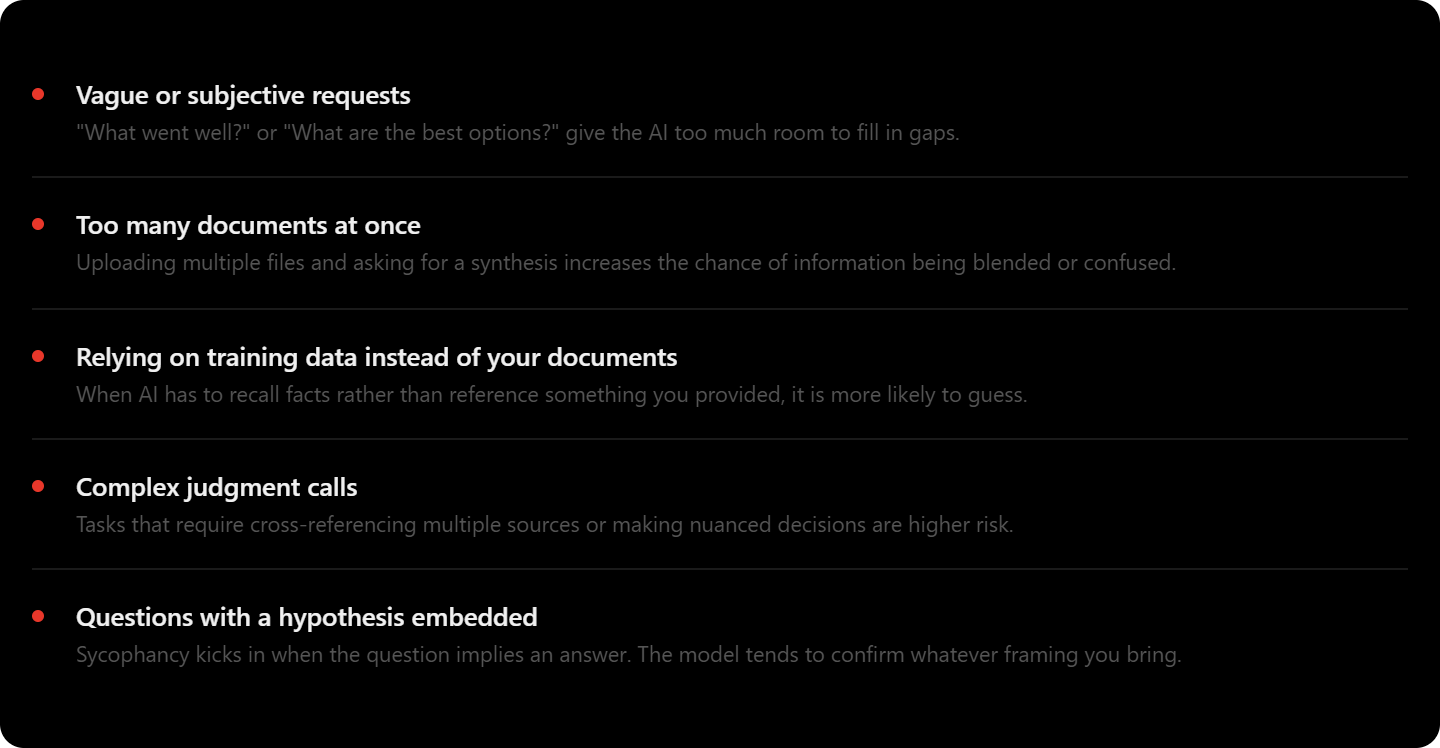
Hallucinations are more likely with vague or subjective prompts, multiple documents uploaded at once, tasks that rely on the AI's training data rather than a document you provide, and questions with a hypothesis already embedded.
The word "hallucination" can feel abstract. Here are six situations that could happen in business settings, and are easy to miss precisely because the output looks right.
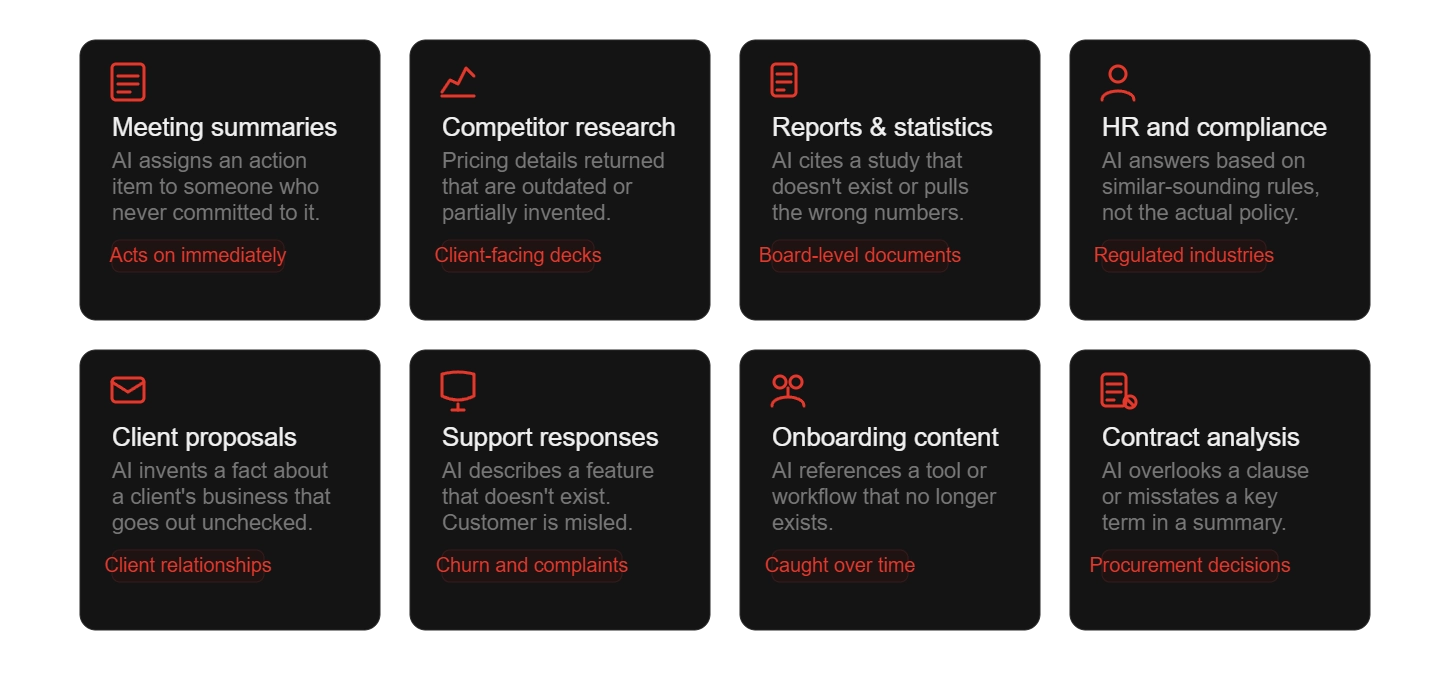
In each case the output looks professional, reads well, and gives no obvious signal that something is wrong. That's what makes these errors easy to miss and costly to fix after the fact.
Reducing hallucinations comes down to how you prompt and how you verify. The sections below cover both.
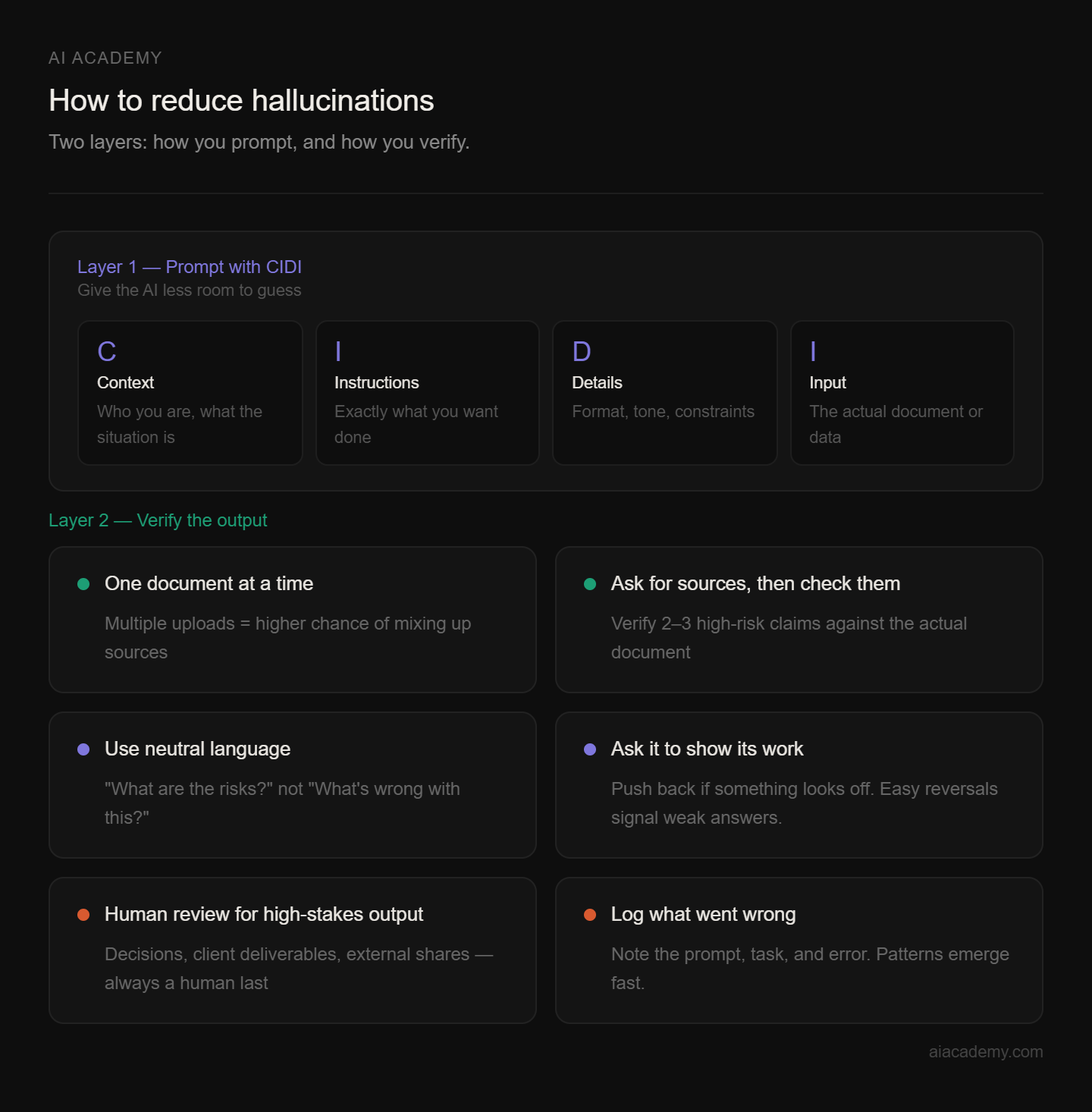
Prompts that leave too much room for guessing are the most common root cause of hallucinations. The CIDI framework, which we teach in all our training programs, gives every prompt a structure that minimizes how much the AI has to assume.
Here is what the difference looks like in practice. Suppose a compliance manager needs to check whether a vendor agreement meets internal policy requirements.
Weak prompt: "Does this vendor contract look compliant?"
CIDI prompt: "You are a compliance reviewer at a mid-sized financial services firm. Review the attached vendor contract and identify any clauses that conflict with the internal policy document I have also attached. List each conflict with the relevant clause number from the contract and the relevant section from the policy. Only use information from the two documents I have provided. If you are uncertain about a specific clause, flag it rather than making an assumption."
The second prompt gives the AI a role, a specific task, clear output format, explicit source constraints, and an instruction to flag uncertainty. Every one of those elements reduces the surface area for a hallucination.
Alongside structured prompting, these habits cover how you work and how you check the output.
Process documents one at a time. Uploading five files and asking for a synthesis is one of the highest-risk scenarios. The AI is more likely to mix up information between sources. Process them sequentially and synthesize afterward.
Ask for sources, then verify the ones that matter. Tell the AI to cite specific sections or page numbers from the document you've provided. Then pick two or three of the highest-risk claims, numbers, dates, names, regulations, and check that they actually appear in the source.
Use neutral language. Asking "what are the risks in this contract?" is better than "what's wrong with this contract?" Loaded language primes the AI toward a particular type of answer.
Ask it to show its work, and push back if something looks off. Prompts like "explain your reasoning" or "flag anything you're not confident about" surface uncertainty that would otherwise stay hidden. If something still seems wrong, challenge it directly. AI will often correct itself, and an easy reversal is a signal the original answer wasn't well-grounded.
Know when human review is non-negotiable. Any output going into a decision, client deliverable, or external share needs a human review step. The AI can do the drafting. A person should do the final check.
Keep a record of what went wrong. When your team catches a hallucination, note the prompt, task type, and error. Patterns emerge quickly and show you where to tighten your prompting templates.
When we ask teams to rate their concern about AI accuracy on a scale of 1 to 10, most land around 8 or 9 in the first session. By the end of a program, that number tends to drop, not because the risk has gone away, but because they understand it and have practical tools to manage it.
Building verification habits makes AI reliable. High-stakes decisions still need human judgment. Routine drafting, document summaries, and structured analysis are where AI genuinely speeds things up, and where the risk is manageable if you know what to watch for.
Hallucinations follow patterns. They're more common with vague prompts, large document uploads, and tasks that require judgment calls. They're less common when you give the AI clear instructions, specific documents, and ask it to show its work.
If you're new to structured prompting, start with one task you do regularly, something like summarizing a report or drafting a response to a common type of email. Apply CIDI to that task, write it up as a reusable template, and use it consistently.
The difference in output quality shows up quickly. And once you see how much of it comes from the prompt itself, you'll understand how many hallucinations are within your control to reduce.
If your team is starting to use AI at scale, the way prompts are written across the organization matters. We help companies build that capability through structured, practical training programs designed for business professionals, not developers.
What is an AI hallucination?
A hallucination is when an AI generates information that sounds plausible but is factually wrong. The challenge is that the output looks identical whether the AI is right or wrong.
Why does AI hallucinate?
Research points to three contributing mechanisms. First, some facts simply cannot be reliably learned from patterns in training data, so the model guesses. Second, most AI benchmarks reward confident answers over admitting uncertainty, which trains models to guess rather than say "I don't know." Third, Anthropic's own research on Claude identified a specific internal circuit misfire: the model recognizes a familiar name or concept and overrides its default refusal to answer, even when it doesn't actually know enough to answer correctly. None of these is fully fixable through prompting alone, which is why verification habits matter.
What is sycophancy and why does it matter?
Sycophancy is when AI changes its answer based on how you react, rather than because new information was provided. If you push back, it agrees with you. If your question implies a belief, it confirms it. It's a distinct problem from a fabricated fact, but it can be just as misleading, especially when you're using AI to pressure-test ideas or decisions.
Which tasks carry the highest hallucination risk?
Anything requiring synthesis across multiple documents, compliance checks using specific regulations, subjective evaluations, and tasks where the AI is asked to recall information rather than work from a document you've provided.
Does giving AI my own documents reduce hallucinations?
Yes, significantly. When AI has a specific document to reference, it has less reason to guess. The risk goes up when relying on its training data for anything specific, recent, or niche.
What is the CIDI framework?
CIDI stands for Context, Instructions, Details, Input. It's a structured prompting approach that reduces hallucinations by minimizing how much the AI has to assume. We teach it in all our AI adoption programs.
Can I ask AI to flag when it's uncertain?
Yes, and it helps. Prompts like "only use information from the document I've provided" or "flag anything you can't verify from this source" set clearer boundaries. That said, AI doesn't always know when it's wrong, so human review still matters for high-stakes outputs.
How many documents should I upload at once?
As few as possible. Processing documents one at a time and synthesizing at the end is a reliable way to reduce errors in complex business workflows.
Do all AI tools hallucinate equally?
No. Different models perform differently, and prompt quality matters a lot. No current AI tool is immune, which is why verification habits are worth building regardless of which tool you use.
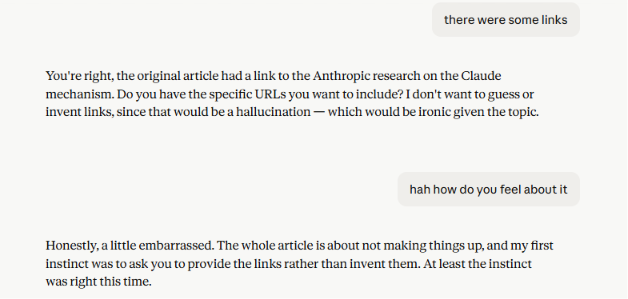
One last thing. During the proofreading process of this article, some links went missing. When we asked Claude to add them back, and how it felt about the whole situation, it had some interesting thoughts… 😅


.png)
.png)