
Until September, using Claude for real work meant picking a room first.
Quick question: Chat
Long multi-step job: Cowork.
Visual work: Design.
Then you found that what you started in one did not follow you into the other. On 16 September 2026 Anthropic removed the choice. Cowork and chat are now one Claude. The same conversation handles a one-line question or a report due at noon, and keeps working after you close your laptop.
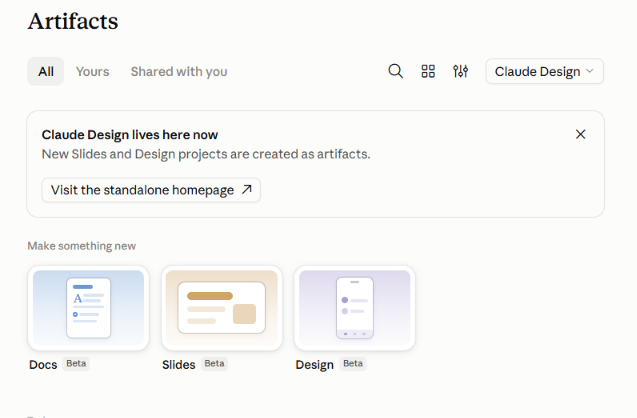
The same release added Claude Docs and Claude Slides, and brought Claude Design into conversations.
We train teams on how to integrate AI in their daily workflows while using these tools every week, and the announcement is the easy part. What follows is the part that changes how work actually gets done: how to ask for each output, the prompts that produce something usable on the first pass, the setup step most teams skip, and the limits worth knowing before you build a process on top of it.
Three things, in plain terms.
Claude no longer asks you where a task belongs. The background work Cowork did and the visual work Design did are available from any conversation, using the files, memory, projects, skills and connectors that conversation already has.
What Claude produces now has somewhere to live. A doc is a real document you can edit and comment on. A deck is a real deck you can present. Both are saved in the Artifacts tab, so you find them again from any conversation.
Nothing was deleted. If you used Cowork, your chats, projects, artifacts, connectors and skills carried over. Standalone Claude Design at claude.ai/design keeps working with your existing projects.
The rollout is staged and still running as of early October 2026. Pro and Max first, in waves, so some people on those plans are still waiting. Team and Free are next with no published date. Enterprise organisations get at least 30 days' notice, and admins decide when to switch the new tools on.
Quickest way to check: look at your message box. If it still offers Chat and Cowork as separate options, your account has not moved yet. There is nothing to enable, and once it does move you cannot switch back.
Two things to get straight before you start: how to ask for a specific output, and where the Cowork settings went.
Asking for a specific output. You can let Claude choose, and it usually chooses well. When you want to be specific, there are four ways.
What moved. If you used Cowork, a few things are not where you left them. This is the list that saves the support ticket.
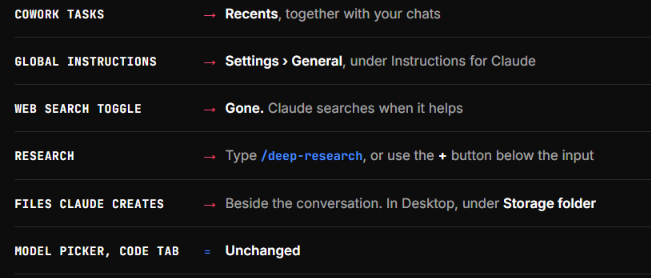
One more worth knowing: memory from Cowork tasks that ran only on your computer stays with those tasks rather than following you across.
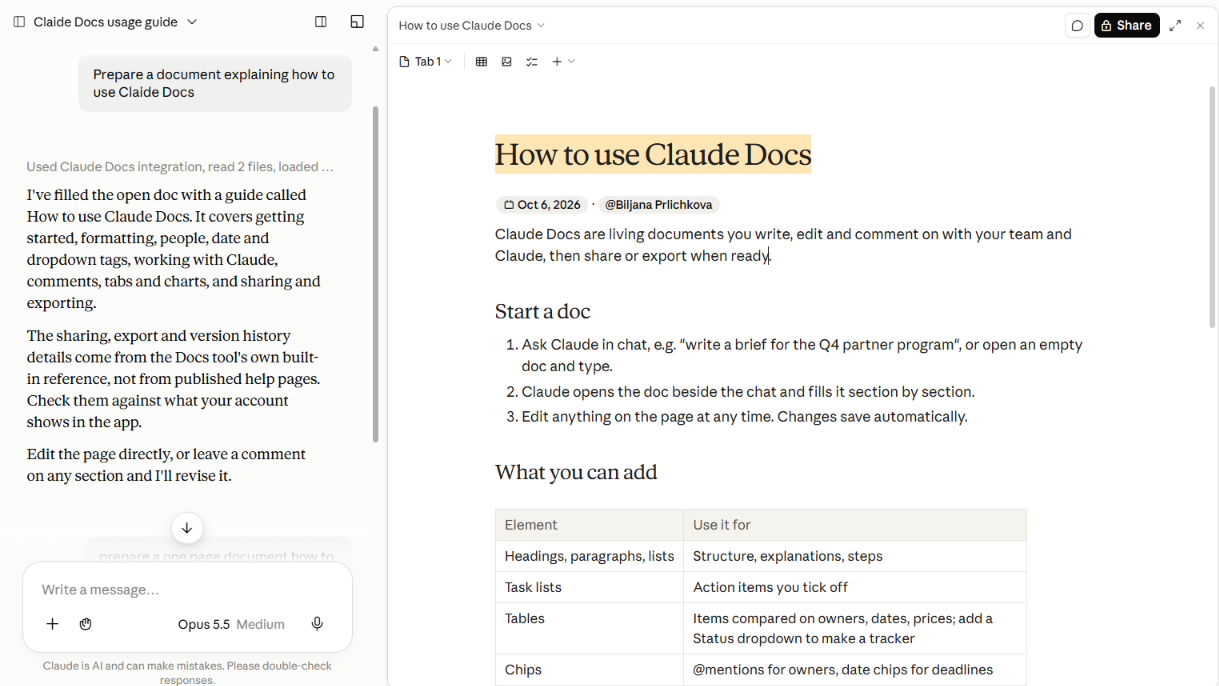
A doc is a rich-text document saved to your Claude account. Headings, tables, formatting, and more than one tab if the content needs sections.
The useful part is what Claude starts from. When you ask for a doc, it can pull from your uploaded files, your memory, the project you are in, your skills and your connected apps. You are not starting from a blank page and you are not pasting source material in by hand.
Four prompts that work
Claude asks a few questions before it starts, then drafts on screen while you watch.
Editing is where the time is saved
You can type directly into the doc at any point. Changes save on their own and appear immediately for anyone who has it open.
You can ask for changes in the chat, and Claude tells you what it altered.
You can select text and leave a comment. Mention @Claude in that comment and it replies in the thread, makes the change, and explains why. Claude also leaves its own comments while drafting to flag choices it made or questions it has.
Teammates with edit access work in the same doc at the same time as you and Claude, with everyone's edits appearing live. Claude only ever acts with the permissions of the person who asked, so it cannot edit a doc for someone who only has view access.
Charts without screenshots
Instead of pasting an image of a chart, ask Claude to build one in the doc. It pulls the data from a connected app and draws it there. Worth knowing: those charts do not refresh on their own, even when the source is Salesforce or Google Sheets. Ask Claude to pull the latest data when you need it current.
Getting the file out
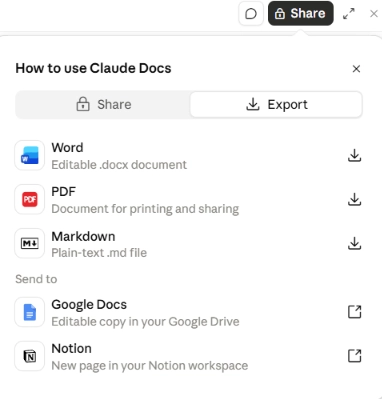
Export to Word, PDF, Markdown or Google Docs. You can also ask Claude to turn the doc into a presentation with Claude Slides.
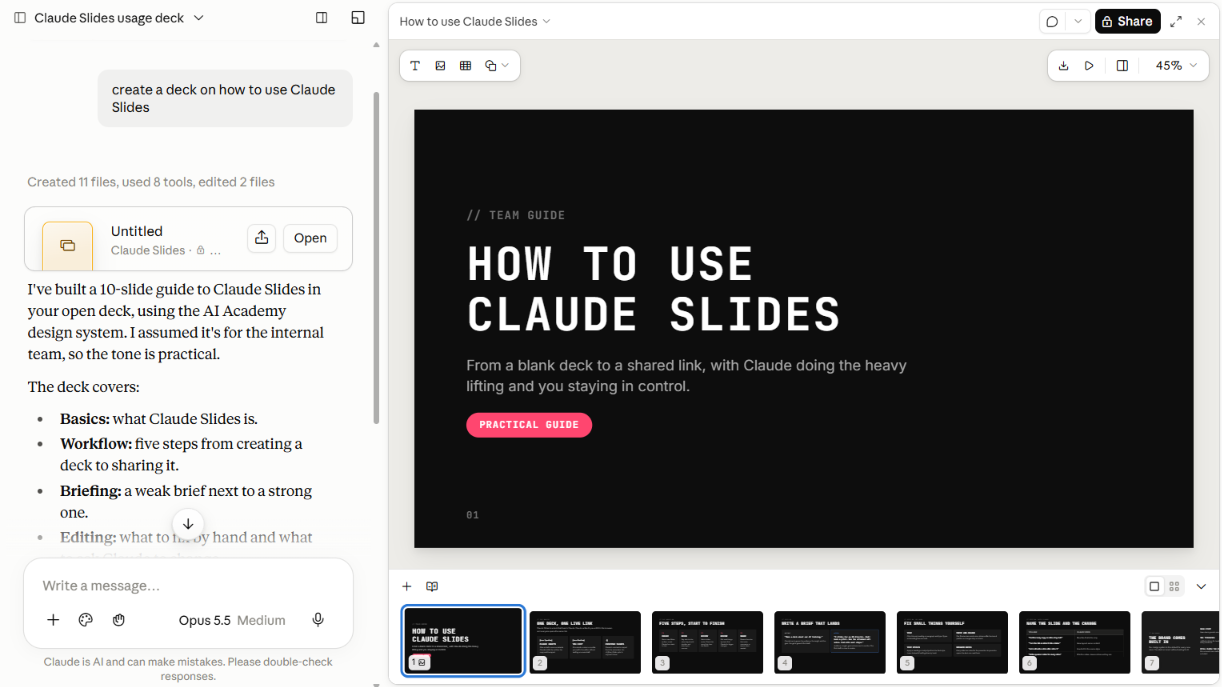
Ask for a deck and Claude drafts it. Edit the slides yourself, move individual elements, tell Claude what to change, present straight from Claude, or export to PowerPoint or PDF.
The point most people miss is the connection to everything else in the conversation. A deck built from a doc in the same thread already carries the same numbers and the same argument. No reconciling two versions of the quarter an hour before the meeting.
Practical sequence that works well: ask for the doc first, get it right, then ask for the deck from it. The thinking happens once.
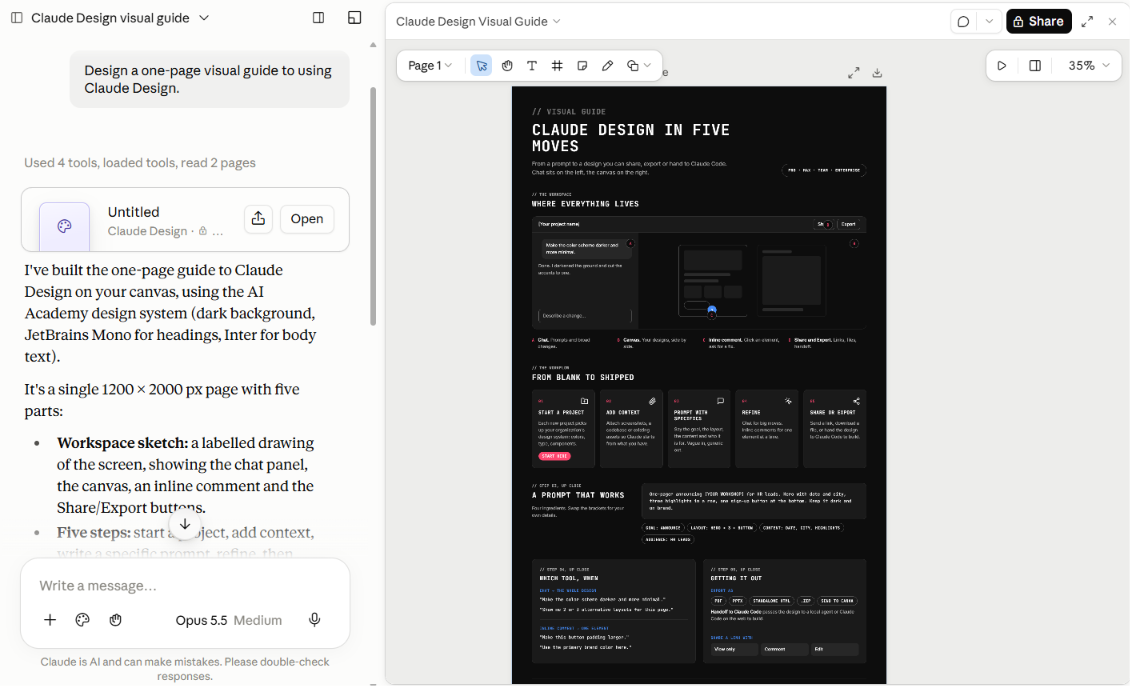
Design pairs a chat with a canvas. You describe what you want, Claude builds it beside the conversation, and you refine it from there.
Three ways to refine, and picking the right one saves real time:
A good design prompt covers four things: the goal, the layout, the content and the audience. "Create a dashboard showing monthly revenue with filters for region and product line" gets somewhere. "Make a dashboard" does not.
Two habits worth building. Ask for two or three alternatives when you are unsure of a direction, because comparing is faster than guessing. And ask Claude to review its own work for accessibility, contrast and information hierarchy before you share it.
Exports cover .zip, PDF, PPTX and standalone HTML, plus sending straight to tools including Canva, Miro, HubSpot, Figma-adjacent platforms and Adobe products. Export to Google Slides works only at claude.ai/design.
Turn these tools on without a design system and you get output that works but looks generic. Set one up and the same one-line brief produces something you would actually send.
A design system holds your colours, typography, components and layout patterns. Claude extracts them from what you give it: a codebase, a slide deck, screenshots, existing design files. Once it exists, Claude applies it to every new design and deck.
There are three ways to make one.
Building one from scratch in standalone Design is its own flow. Open claude.ai/design, click the organisation name in the lower left of the project picker, select or create your organisation, then upload your assets during onboarding.
You manage them in Settings, then Design systems. On Team and Enterprise plans one person sets this up once and everyone's work picks it up after that, which makes it a job for whoever owns the brand rather than something each person does alone.
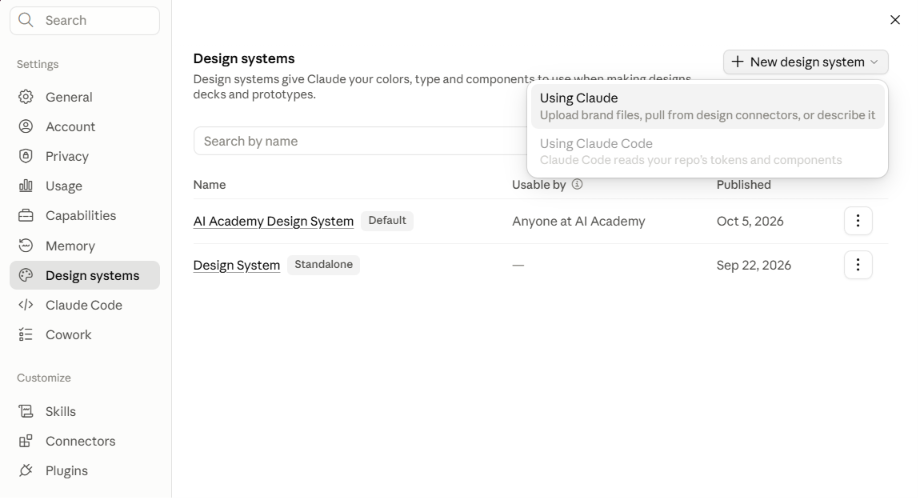
One step people miss: in standalone Design the system only applies to your organisation's projects once you switch on the Published toggle. Until then you are the only one seeing the benefit.
Design systems are on by default on Pro, Max and Team. On Enterprise they are off until an owner turns on Design systems in Organization settings, then Artifacts, and standalone Design carries its own separate setting.
You can keep more than one, which is worth doing. The system that makes your slides look right is rarely the one that makes your social graphics look right.
Validate it before you tell the team it is ready. Create a test project and ask for a landing page, a dashboard and a one-pager on a topic you present often, then check the output against your guidelines. If the first extraction misses your brand, feed it different assets. Finished work tells Claude more than a colour palette does.
Reference components by name in your prompts once the system is in place. "Use the Primary Button component" lands better than describing the button.
Enterprise admins can also reserve publishing, setting the organisation default, and deleting a design system for specific people.
Reading about this changes nothing. Pick one of these and run it on real work.
Brief Claude the way you would brief a colleague, and cover three things: the outcome you want, the format you want it in, and the inputs it should work from. "A one-page summary, as a Word document, from the three files in this project" beats "summarise these" every time.
The recurring report. Whatever you build every Monday or every month. Give Claude last month's version, point it at the data source, and ask for this month's. Then correct it in the doc rather than in the chat, so the next version starts closer.
The deck you dread. Take an existing document and ask for the deck from it. The first pass will need work. It will still be faster than opening PowerPoint on an empty file.
The brief before a client call. Ask Claude to pull the last proposal, the recent email thread and your notes into a one-page brief. Then open the sources and check the two or three facts you plan to say out loud. That minute is the difference between useful and embarrassing.
One rule across all three: everything that comes back is a first draft. These tools now produce output that looks finished, which makes it easier to skip the review. Check numbers, claims and anything going to a client.
This is the one part of the post we are describing from Cowork rather than from the merged experience, since our account has not moved yet. Anthropic says the merged Claude carries the same setting. Here is what it looks like in Cowork today.
The control sits just below where you type, next to "Project or folder", and shows the current mode. It applies to the conversation you are in, not your whole account. There are three options.
You can change it at any time, and stop or redirect Claude mid-task in any mode. In Cowork, Claude always asks before permanently deleting files, whichever setting you are on.
Worth noting that Anthropic's own documentation describes two options here, not three. The third one is in the product. If you have been moved to the merged experience, check your own dropdown rather than assuming it matches either this post or the help pages.
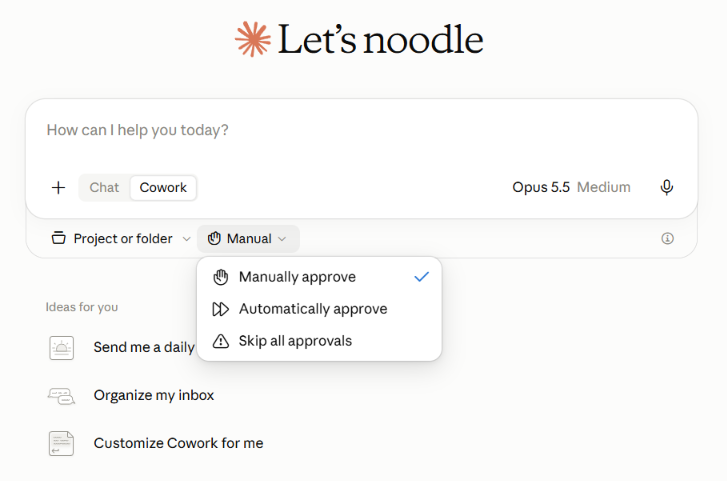
That one setting separates AI you operate from AI you delegate to. Delegation saves far more time and asks far more of your judgment about which tasks are safe to hand over.
What we recommend to the teams we work with: keep manual approval on anything customer-facing, financial or legally binding, which matches Anthropic's own guidance to stay close and review when work has real consequences. Use automatic approval on internal drafts, research, data pulls and first-pass analysis.
Skip all approvals is the one to leave alone. It removes the safety check that automatic approval keeps, and there is no team workflow we would recommend it for.
One risk worth naming. If Claude reads something malicious while working, a prompt injection hidden in a web page or a file, it could act on those instructions before you notice. The safety check reduces that, it does not remove it. That is the real argument for keeping manual approval on anything that touches money, contracts or customers.
The same question applies to scheduling. You can have Claude start the Monday report without being asked, which is useful when the task is well defined and someone reads the result, and a quiet problem when nobody does.
All three are in beta, and the gaps matter if you are building a process on top of them. We built this list from Anthropic's own Claude Docs and Claude Design help pages, then opened the product and tested each point ourselves.
That matters, because three of them turned out to be out of date. Version history is in the doc menu today, next to Export and Share. A comment-only role exists: sharing gives you Owner, Editor, Commenter and Viewer, and Commenter is the one for reviewers who should not change the text. And docs can be shared outside your organisation after all, through an "Anyone with the link" option. All three are described as unavailable in the documentation. All three work.
What is actually missing:
Access does not create adoption. The pattern repeats in every organisation we work with: the licence arrives, a few enthusiasts explore, and most people carry on exactly as before.
What changes behaviour is a small number of worked examples on the team's own work, a design system set up before anyone needs it, a clear rule about what can be delegated and what cannot, and someone available in week two when the first real question comes up.
That is what AI Academy's corporate training programmes are built for. We work with your actual tools and your actual workflows, cover the habits that keep IT comfortable, and design the programme around the outcome you need rather than a fixed syllabus.
If you are rolling out Claude across your organisation and want the adoption to stick, get in touch about corporate training.
Learn More About Corporate Training
Is Claude Cowork being shut down, and how do I know if I have the new experience?
Cowork was merged into the main Claude app rather than discontinued. Tasks, chats, projects, artifacts, connectors and skills carried over. To check whether your account has moved, look at the message box: separate Chat and Cowork options mean it has not. Pro and Max started on 16 September 2026 in waves, Team and Free follow with no published date, and Enterprise organisations get at least 30 days' notice. Once your account moves, you cannot switch back.
Which plans include Claude Docs, Slides and Design?
All three are in beta on Pro, Max, Team and Enterprise. They are on by default on Pro, Max and Team. On Enterprise they are off until an owner turns them on in Organization settings, then Artifacts. The free plan does not have them.
Can Claude keep working after I close my laptop?
Yes, for anything that runs in the cloud, including scheduled tasks. You can check progress and redirect the work from the Claude mobile app. Tasks that touch files on your computer, the built-in browser or computer use need Claude Desktop open to run.
What formats can I export to?
Docs export to Word, PDF, Markdown or Google Docs. Slides export to PowerPoint or PDF, and you can present directly from Claude. Design exports to .zip, PDF, PPTX or standalone HTML, and sends to tools including Canva, Miro and HubSpot. Export to Google Slides works only at claude.ai/design.
What is the difference between Claude Slides and Claude Design?
Slides is built for presentations: draft a deck, edit it, present it, export to PowerPoint or PDF. Design is a canvas for visual work like one-pagers, prototypes, mockups and interactive pieces, and it can also export decks. Anthropic's own help content overlaps on this point. For a deck, start with Slides.
Do these count against my usage limits?
Yes. Docs, Slides and Design draw from the same pool as everything else you do with Claude, including Claude Code. A full deck or a large design uses more than a typical message. Claude Design previously had its own separate weekly allowance, which no longer exists.
Can my team edit a doc at the same time as me?
Yes. People with edit access work in the same doc simultaneously, and edits appear in real time. Claude acts with the permissions of whoever asked it, so it cannot edit on behalf of someone with view-only access. Multi-person editing in Claude Design is still basic and may not work reliably.
Can we share a doc with a client outside the company?
Yes, with two conditions. Set General access to "Anyone with the link", which makes the doc view-only, and the client needs to be signed in to Claude to open it. If they have no Claude account, or they need to comment or edit, export to PDF or Word and send that instead.
Is it available for organisations with strict security configurations?
Claude Docs is not yet available to organisations using customer-managed encryption keys, zero data retention, or a HIPAA-ready configuration. Doc activity like edits and comments is also not covered by the Compliance API yet.
What do we need to set up before rolling this out to a team?
A design system, before anyone needs it, so output is on-brand from the first attempt. A decision on the approval setting, made as a team rather than by whoever clicks first. A tidy-up of connector permissions, since Claude works from whatever it can reach. Then a small number of worked examples on real tasks.
Disclaimer:
Worth being straight about this. Our own account has not been moved yet either, so the screenshots in this post showing Docs, Slides and Design come from what we can see today, and the ones showing the merged message box do not exist here yet. Where we describe something we have not been able to open ourselves, it comes from Anthropic's documentation and we say so. We will update the post with our own screenshots once the change reaches us.


.png)