
Most companies are past the "should we use AI?" question. The real problem now is consistency.
One team has figured out great prompts for writing proposals. Another is still copy-pasting the same paragraph into ChatGPT and wondering why the output is mediocre. Nobody is talking to each other. Good setups live in personal accounts and disappear when people leave. Every person starts from scratch, makes avoidable mistakes, and has no reference point when something new comes out. The cost is invisible, spread across dozens of people, and nobody adds it up. But it is real.
An internal AI playbook, sometimes called an AI knowledge hub, is how you fix that. It is a shared, living document where your team records what works, what does not, and how to use AI effectively for your specific context. Think of it as an onboarding guide, a prompt library, and a guidelines document rolled into one.
Building one does not require a massive IT project or a dedicated AI team. It requires clarity on what you want to capture, a place to put it, and someone willing to keep it alive.
An AI playbook is an internal reference document that helps your team use AI tools consistently and effectively. It answers the questions people are already asking informally: which tools should we use? How do we write a good prompt? What can we share with AI and what should we keep private?
A good playbook covers four areas:
Done right, it becomes the first place people go when they have a question about AI at work.
The fastest way to kill an AI playbook before it starts is to try to make it cover everything. Start with one team or one use case.
Pick a function where AI is already being used, even informally. Marketing and content teams are a common starting point, because they are often already using AI for drafting and editing. Customer support is another good option, because the tasks are repetitive and prompts can be standardized quickly.
Ask the people on that team: what tools are you using? What prompts have you found useful? What mistakes have you made that others should avoid?
You will have the foundation of your playbook in an afternoon.
Your playbook needs to live somewhere everyone can find it. The format matters less than the accessibility.
Most companies already have a tool for internal documentation. Notion, Confluence, Google Docs, SharePoint — any of these work. The key is that it should be searchable, easy to edit, and not buried three levels deep in a folder nobody opens.
If you want to go further, some companies build their playbook into a simple internal interface where people can ask questions and get answers without searching through a document. A well-organized document is the right starting point for most teams.
Before you get to prompts and guidelines, document the basics: how people get access, which account to use for company work, and what to verify before starting.
If your company uses a team or enterprise plan for an AI tool, this section matters more than it seems. Company conversations should not mix with personal accounts. Content should not move between the two. These boundaries are easy to miss and worth spelling out explicitly.
Also point people to their global preferences before their first conversation. Most enterprise AI tools let users set instructions that apply to every chat. See the feature reference section below for a recommended starting template.
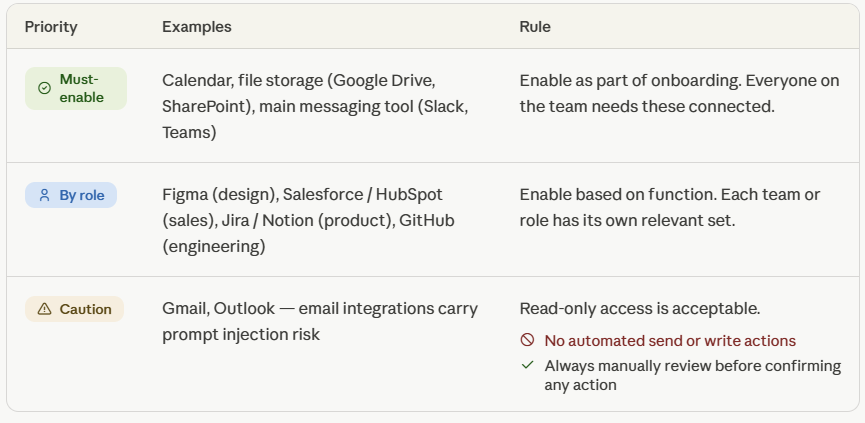
Most modern AI tools connect directly to the apps your team already uses: email, calendar, Slack, Google Drive, project management tools. Document which integrations your company has approved, what each one is for, and any relevant warnings.
A tiered structure works well here: must-enable for everyone, conditional based on role, and caution-flagged for specific risks.
Some connectors carry risks worth calling out directly. Email integrations, for example, can be vulnerable to prompt injection, where a crafted message contains hidden instructions the AI might follow. For those, the guidance should be clear: read-only access is acceptable, but automated send or write actions should always require manual approval.
This is the most valuable part of any AI playbook, and the easiest to build collaboratively.
A prompt library is a collection of tested, reusable prompts your team uses regularly. Each entry should include the prompt itself, what it is for, the tool it works best in, and any notes on how to customize it.
For example, a marketing team might store prompts for writing first drafts of blog posts, summarizing customer interviews, or generating subject line options for email campaigns. A sales team might have prompts for researching prospects or drafting follow-up emails. A legal team might store prompts for reviewing contracts or summarizing documents.
The prompts that end up in the library should come from real use, not from what sounds good in theory. When someone on your team gets a great output, ask them to share the prompt. That is how the library grows.
If your team uses projects or workspaces within an AI tool, document the shared ones here too: what each project is set up for, what context it has pre-loaded, and what to put in versus what to expect out.
People need to know what they can and cannot do with AI at work. But the way most companies communicate this, if they do at all, is through a policy document written in legal language that nobody reads.
Write your guidelines as a practical FAQ instead. A few questions to answer directly:
If you do not have an AI use policy yet, build that first. The policy sets the rules. The playbook handles the how. Our guide on how to create an AI use policy for your company is a good starting point.
This is where many playbooks stop short. They cover which tools to use but not which feature within those tools to reach for. Modern AI platforms are not just chatbots. They have distinct features that serve different purposes, and knowing which to reach for saves a lot of time.
Here is a breakdown of the main features worth documenting, what each one does, and how teams typically set them up.
Global instructions that apply to every conversation. Set them once and forget about them. They cover things like your role, preferred language, tone, and formatting rules.
Good preferences are specific and use negations: "no bullet points unless explicitly needed" works better than "be concise." Keep them under 500 words. The more rules you add, the less weight any single one carries. In-conversation instructions always override preferences, so employees can adjust for specific tasks without changing their global settings.
This is a personal setting, not a team one. Every employee sets their own. Your playbook should include a recommended starting template, but each person adapts it to their role.
A dedicated workspace where you can upload documents, define persistent instructions, and group related conversations. The AI has continuous access to everything in the project across every chat within it, without you needing to re-explain the context each time.
Projects are for recurring work with a stable context: a specific client, a brand, a product line, a research area. One project per context is the right mental model. "Q2 Product Launch" is a good project. "Write emails" is not.
This is where the team-level value comes in. On team and enterprise plans, projects can be shared across the organization. A shared project for your brand voice, pre-loaded with tone guidelines and past examples, means every person on the team starts from the same baseline without anyone having to set it up twice. Document your shared projects clearly: what each one is for, what files are in it, and what to put in versus what to expect out.
One rule worth including: shared project instructions should not be modified individually. If someone needs a custom version, they make a private copy and edit that.
Reusable procedures stored as instruction files that the AI activates automatically when it detects a relevant request. Where projects give the AI knowledge about your context, skills give it a procedure for how to execute a specific type of task.
A skill for writing blog posts, for example, might encode your SEO structure, heading format, tone rules, and CTA template. Every time someone asks for a blog post, those rules apply without needing to be re-stated in the prompt.
Skills can be personal or shared at the organization level. Organization-level skills activate for everyone on the team automatically, which makes them one of the highest-value things to build and document. Your playbook should list which shared skills are active, when each one fires, and how to trigger one manually if it does not activate on its own.
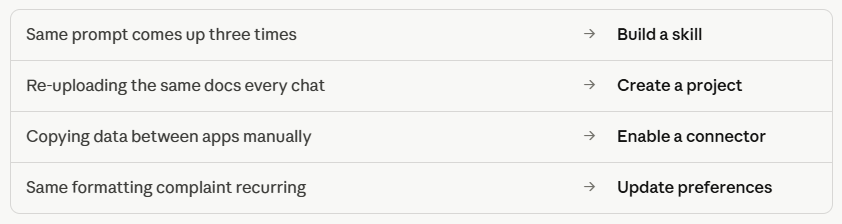
A useful rule of thumb: if the same prompt comes up three times in a week, it belongs in a skill.
Structured outputs generated in a dedicated side panel, separate from the chat. Useful for anything substantial that you will iterate on or use outside the conversation: a document, a piece of code, a data visualization, a structured report.
The key difference from a regular chat response is that artifacts are designed to be edited, versioned, and shared. On most platforms, a published artifact works for anyone with the link, no account needed.
Finally, check what is available in your specific toolstack. Some platforms offer additional capabilities like agent mode, enterprise search, or role-specific automation bundles. If yours does, document them the same way: what they do, when to use them, and what to review before letting them run.
Close this section with a short cheat sheet. Four lines covers most situations:
A playbook with no owner stops being updated after two months.
The owner does not need to be a full-time role. It could be someone in operations or IT, a department lead, or an internal AI champion who is interested in this area. Their job is to keep the playbook current as tools evolve, add new prompts when useful ones are discovered, and field questions from the team.
A simple maintenance system: schedule a quarterly review where the owner checks that the tools listed are still accurate, adds anything new the team has found useful, and removes anything outdated. It takes a couple of hours and keeps the playbook worth opening.
A shared Slack or Teams channel where people drop useful prompts or flag mistakes also helps. The owner reviews it periodically and updates the playbook accordingly.
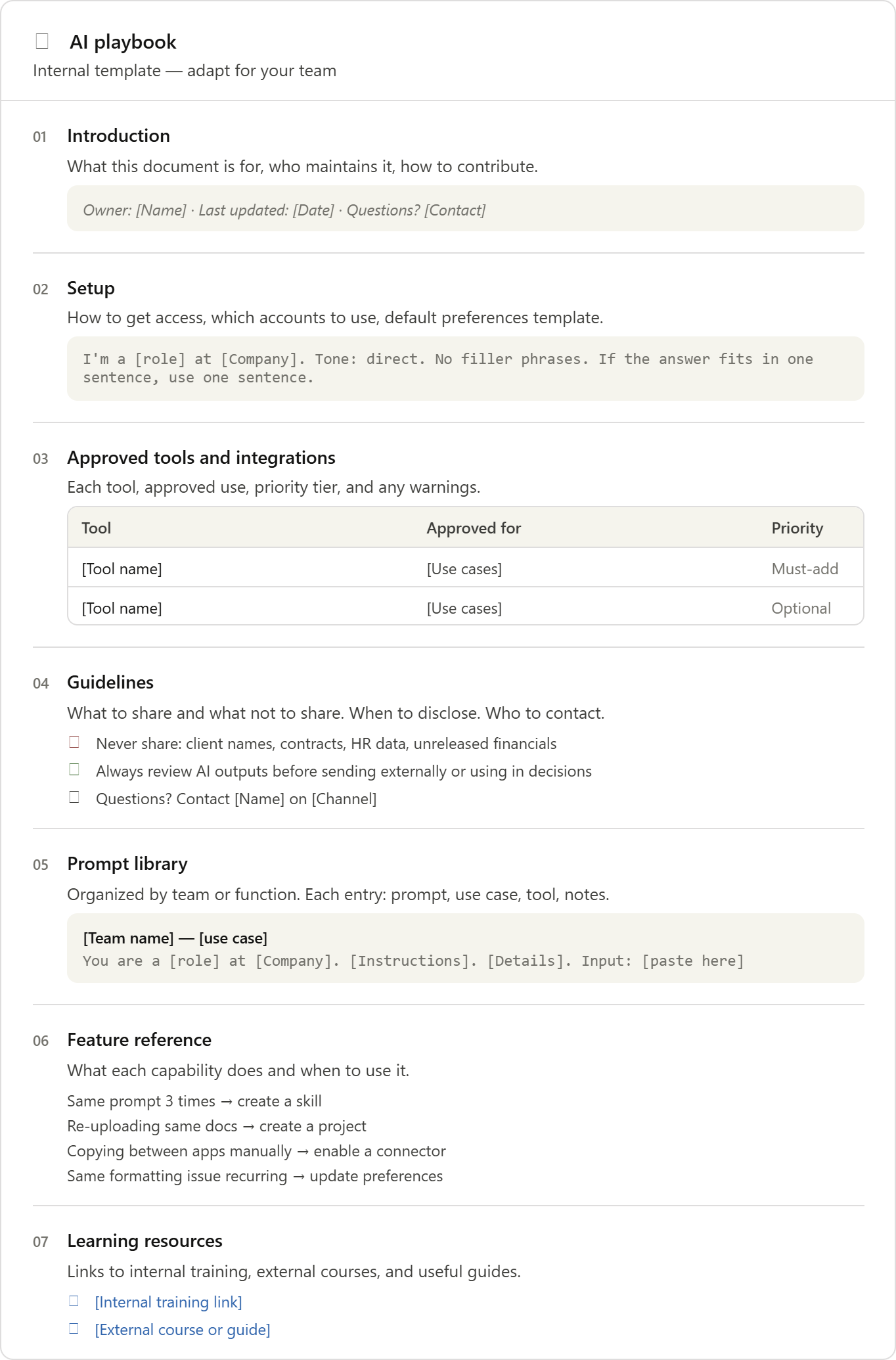
Here is a simple structure to adapt:
An AI playbook is not just a document. It is a signal to your team that you take AI seriously enough to support them in using it well.
When people have a place to go for answers, they make better decisions. When prompts are shared, everyone benefits from what the best users on your team have figured out. When guidelines are clear, people feel comfortable experimenting instead of avoiding AI because they are not sure what is allowed.
It also creates the foundation for something bigger. Once you know how your team is using AI, you can identify the highest-value opportunities, spot skill gaps, and make smarter decisions about where to invest in training.
The companies that do this well will not just use AI. They will get dramatically more from it than the ones that leave it to chance.
Ready to build AI skills across your team? At AI Academy, we work with companies to design practical training programs that go beyond individual skills and build real organizational capability. From onboarding to advanced application, our corporate programs are tailored to your industry, your tools, and your team's starting point.
Get in touch to learn more about AI Academy Corporate Training.
What is the difference between an AI playbook and an AI policy?
A policy sets the rules. A playbook tells people how to work with AI day to day, including the tools, prompts, and practical guidance they need to get results. Most companies need both. If you do not have a policy yet, build that first, then use the playbook to make it practical.
How long does it take to build one?
A basic version covering one team can be put together in a few days. A full company-wide playbook typically takes two to four weeks, depending on how many teams are involved and how much alignment work is needed upfront.
Who should own the AI playbook?
Whoever is most engaged with AI adoption in your company. This could be someone in operations, IT, or a department lead with a strong interest in the topic. What matters is that it is a named person, not a committee.
What tools work best for hosting it?
Notion, Confluence, Google Docs, and SharePoint are all good options. Choose whichever tool your team already uses for internal documentation. Accessibility beats sophistication.
How often should it be updated?
At minimum, quarterly. The AI tool landscape changes fast enough that anything older than six months should be reviewed for accuracy.
Can a small company benefit from an AI playbook?
Yes, often more than a large one. With fewer people, a shared document can be simpler and easier to maintain. And because communication happens faster in small teams, prompts and learnings spread quickly once they are written down.
How do we get people to actually use it?
Mention it in onboarding. Reference it in team meetings when AI comes up. Make sure the owner actively shares updates rather than waiting for people to find the document on their own. A playbook that gets talked about gets used.
What is the most common mistake companies make when building one?
Trying to make it perfect before sharing it. A rough version that people can start using and improving is worth far more than a polished document that takes months to finish.


.png)