
You are halfway through a task. The AI assistant has read your files, pulled a few numbers, drafted something useful. Then it slows down, loses track of something you told it ten minutes ago, and eventually tells you it cannot continue. Or you get a message saying you have run out of credits for the month.
This catches people out as they hand more of their work to an AI assistant. The more you use it, the more likely you are to meet the ceiling. A budget attached to a piece of software still feels unfamiliar. You open a tool, you use it, and that is that.
AI platforms work differently. Every request you send draws from an allowance, that allowance resets on a schedule, and nothing carries over. Two people can ask for the same output in the same week and spend very different amounts doing it.
This guide explains what is happening when you send a request, the two limits people mix up, what drives most of the spend, and the habits that make an allowance last.
Everything you send and receive is measured in tokens. A token is a piece of text smaller than a word, roughly three quarters of one in English. Your question, the file you attach and the answer that comes back all convert to tokens, and the total is what you spend.
You will rarely see the word "tokens" in your account. What you see is a progress bar with a percentage, telling you how much of your allowance is left and when it refills. That is the default in both Claude and ChatGPT.
Some plans add a second number, the one your account labels credits or extra usage. It is a separate pot that lets you keep working once the allowance runs out, held in currency rather than tokens. Both platforms have one, and who controls it depends on your plan. On individual plans you switch it on and add the funds yourself. On company plans an owner buys it centrally, sets a spending cap and decides who can draw on it, and on some plans the usage is billed after the fact rather than paid up front. If nobody has switched any of this on, you never see it.
Whatever your plan puts on the screen, tokens are what is being counted underneath. That is why the habits later in this guide work the same way on any plan and in either tool.
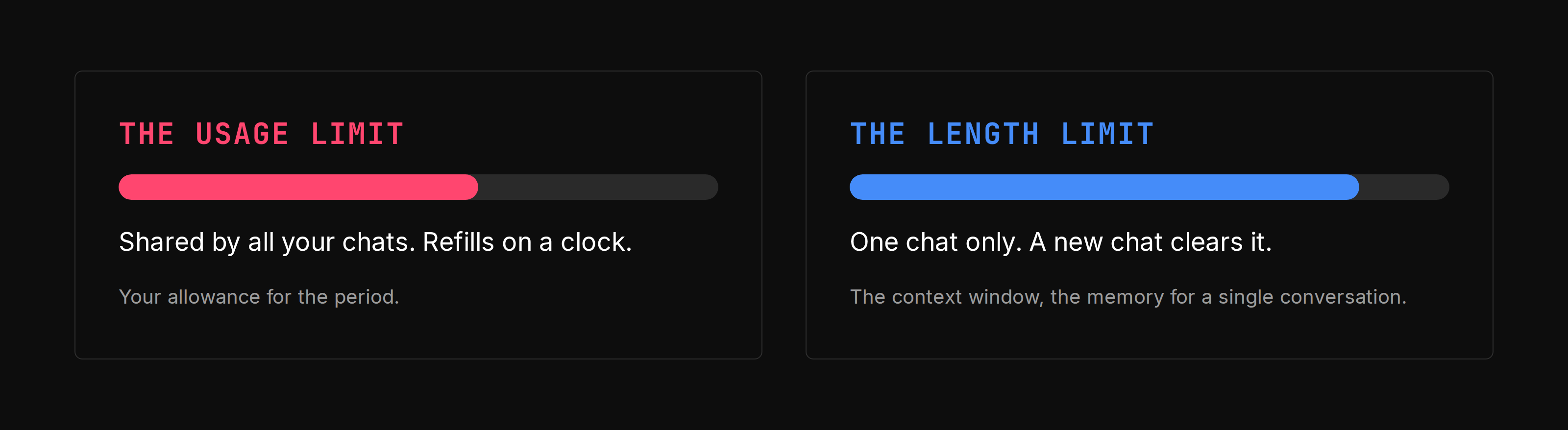
Hitting a limit is two different events with two different fixes. Most people treat it as one.
This is your allowance across all your conversations, and it refills on a schedule set by your plan. What drives it is the same wherever you work. How long your messages are, the size of the files you attach, how long the current conversation already is, which tools you switch on, which model you pick, and whether the assistant is producing documents or code alongside its answer.
To check it, go to settings, under Usage. Both tools show a progress bar for how much of your allowance you have spent and when it refills.
When you hit this one, you wait for the reset, buy credits, or upgrade.
This is the context window, the assistant's working memory for a single chat. It is sized per model, so the figure changes with what you select, and part of it is always held back for the response. It does not start empty either. Before you type anything, part of the window is taken by the assistant's own instructions and the list of every tool and connector it can reach. The instructions are fixed. The connector list is not, which is the part you control.
There is no meter for this one, so watch for the signs instead. Replies slow down, the assistant misses constraints you set earlier, and details from the start of the chat go missing.
When you hit this one, a new conversation is the only thing that clears it.
Four things account for most of the spend.
Vague requests make the assistant read everything. Point it at a large knowledge base and ask it to find something, and it has to look around first. All that reading lands in the context window and stays there for the rest of the task, even though you never see it.
We tested this with the same question asked two ways. The broad version named an entire internal knowledge hub and asked the assistant to find the right page. The narrow version named the exact page and pasted the link. Both returned a near-identical answer. The broad version consumed roughly a quarter more of the context window, and the only difference was telling it where to look.
Long conversations re-read themselves. The assistant re-reads your conversation every time rather than remembering it. Every message carries the whole history with it, so your fifth request is one request plus everything that came before. Keep a chat running all week and each new question costs more than the last.
That is also what causes the behaviour people report most often. Once a conversation fills its window, the assistant summarizes what came earlier and works from the summary. On very long tasks the summarizing can loop until the task stops making progress. When that happens, take whatever output you have and open a fresh conversation.
Attachments and tools are heavy. The size of the files you attach counts, and so does every tool you call, with search and research features among the most expensive. A single long document can take a large bite out of a window. Long pastes behave the same way, and past a certain length they get turned into an attachment rather than left in the message.
Thinking costs. You get some say in how hard the model works before it answers, whether that comes as an effort setting or a choice between a fast model and a reasoning one. That thinking is part of what you spend, which makes it money well spent on messy multi-step analysis and wasted on renaming files.
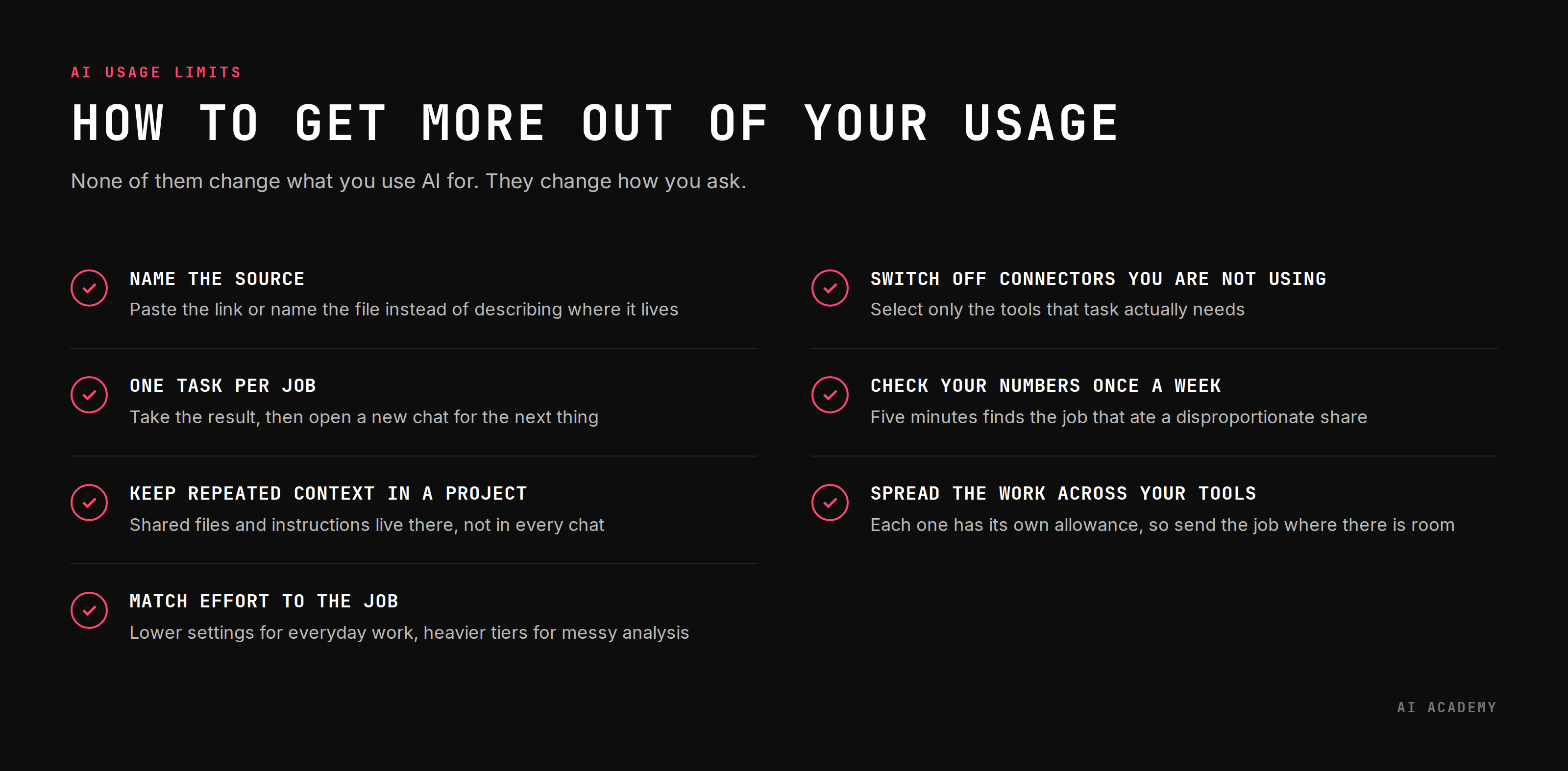
Seven habits. None of them change what you use AI for. They change how you ask.
Name the source instead of describing it. "Find the onboarding policy somewhere in the HR space" is a research project. "Summarize the onboarding policy at this link" is a request. Paste the link, name the file, name the folder. Plan the request before you send it and read it back once. Our guide to the CIDI prompting framework covers how to structure the rest once you have named the source.
One task per job. Finish what you asked for, take the result, and open a new conversation for the next thing. Chaining five jobs into one chat means job five pays for jobs one through four.
Put repeated context in a project. People keep one conversation running because they do not want to repeat the same background every time, which is fair. Projects solve it properly. Put the shared files, links and instructions in the project rather than in every chat, keep the instructions short, and delete files you have stopped using. Claude documents the payoff most plainly: project content is cached, so reusing it does not count against your limits, and only new or uncached parts do.
Match effort to the job. The lower effort settings, or the faster models, handle most everyday work. Save the heavier reasoning tiers for messy multi-step analysis, where the extra thinking earns its cost.
Switch off the connectors you are not using. Turn off search, research and any connector a conversation does not need. Before a heavy multi-step task, select only what that task needs. A closed door does not get opened.
Check your numbers once a week. Five minutes reviewing the week tells you more about your habits than any guide will. You will usually find one or two tasks that ate a disproportionate share, and they are almost always the ones you left open for days.
Spread the work across the tools you already have. Most teams have access to more than one assistant, plus whatever AI is built into software they already pay for. Each one comes with its own separate allowance, so a task you run in one does not touch the budget of another.
That makes it worth a moment's thought about where a job goes. Quick rewrites, summaries and first drafts can go to whichever tool has the most room left. Save the one with the tightest allowance for the work only it can do: tasks that span several files and tools at once, jobs with many steps, anything you want running on a schedule.
A request specific enough to stay inside your allowance is also specific enough to get answered properly. Naming the file, setting the boundaries and keeping one job per conversation are what good prompting looks like anyway. Spending less is a side effect of working better.
That is why these habits are worth building even on a plan you will never max out. They make the assistant quicker to work with, the answers easier to trust, and the work easier to hand to someone else. Model names, menus and prices will keep changing. How you frame a request carries across all of it.
It matters for whoever picks the subscription, too. Most companies are still working out what to buy, how much to give each person and who needs the heavier tier. They are deciding it from numbers produced by people nobody has shown how to use the tool well. Habits first, and then the usage data means something. A team that works carefully and still runs out has told you something real about the plan. A team that runs out because everyone keeps one chat open all month has told you something about training.
Most teams are never taught any of this. People work it out alone, at different speeds and with different results, and whoever does figure it out rarely passes it on.
AI Academy runs corporate training built around how your teams already work, combining our training methodology with content specific to your industry and your tools. Your teams learn where AI helps their actual work and where it does not, and how to apply it reliably rather than occasionally. They also build the habits that keep quality and cost predictable, inside the limits of whatever plan they are on.
Learn More About Corporate Training
How does the five-hour session window actually work?
On Claude it is a rolling window rather than a fixed daily slot. The clock starts when you send your first message and the allowance refills five hours from that moment, whether you used all of it or none. Start at 09:47 and the window runs to 14:47. Weekly caps behave differently and reset on a fixed schedule assigned to your account, so a heavy Monday can still limit you on Thursday.
ChatGPT also runs five-hour and weekly limits on some products, and OpenAI publishes less about when the window starts, so check your own usage page rather than assuming the two behave identically.
Why does a higher effort setting cost so much more?
Because you are billed for reasoning you never read. OpenAI notes that reasoning models produce internal reasoning tokens that are not shown as answer text, so the model can spend heavily on a problem before a single word reaches you. That is what you are buying at the higher tiers, which is why they earn their cost on hard problems and waste it on simple ones.
Does working in a language other than English cost more?
Often, yes. Token counts are not the same as word counts, and OpenAI is explicit that the relationship between characters, words and tokens differs between languages. Languages using non-Latin scripts tend to need noticeably more tokens for the same content. For teams working in European languages the difference is modest though real.
Does deleting, editing or regenerating a message change what I have spent?
Deleting does not give anything back, because usage is spent the moment the request runs. Editing and regenerating both cost again, since each one sends the conversation to the model afresh. Rewriting a prompt three times costs roughly three times as much as getting it close on the first attempt, which is a practical argument for reading your prompt before you send it.
Does attaching the same document to several conversations cost each time?
Yes. Each conversation is separate, so a file you attach in three chats is read three times and charged three times. This is the reason projects are worth setting up for anything you reference regularly, since content held there is reused rather than re-read from scratch.
Do Claude and ChatGPT meter usage the same way?
No, and the difference is structural. On Claude, whatever you do in the web app, the desktop app and Claude Code draws on one shared allowance. ChatGPT keeps its experiences apart, so ordinary chat and the agent features run on separate allowances, and reaching a limit in one does not necessarily stop the others. Its own usage and analytics pages show as much: on the plans that display them, they meter agentic products and exclude Chat conversations. Both platforms also meter images, voice and file uploads separately from chat.
How big is the context window in each tool?
It depends on the model, and the two sit far apart. Anthropic says the newest models on paid plans support up to a 1M token context window, while others support 500K or 200K, with a portion always reserved for the response. OpenAI publishes smaller figures for ChatGPT, with everyday chat well below its reasoning models, so a long document behaves very differently in the two tools. Both companies revise these numbers frequently, so check your plan's page rather than trusting a figure from an article.
Does letting ChatGPT choose the reasoning model cost anything?
Possibly, depending on your plan. OpenAI says automatic reasoning does not count against your manually selected reasoning allowance on personal plans. Its Business documentation says automatic reasoning may draw on that allowance even with the everyday model selected. Worth confirming for your own plan before you rely on it.
Can a manager or admin see how much we use?
On business plans, generally yes at some level of detail. Team and Enterprise workspaces on both platforms give admins usage analytics, and OpenAI's Enterprise and Edu workspaces let admins set monthly limits per person. Conversation content and usage figures are different things, so if you want to know what your organization can see, ask whoever owns the rollout rather than guessing.
Do unused tokens roll over to next month?
Plan allowances reset rather than accumulate, so a light month does not buy you a heavy one. Purchased credits work differently, and on a company plan two rules matter. OpenAI states that ChatGPT workspace credits are valid for 12 months from purchase, so an unused balance is not banked indefinitely. Those credits are also pooled across the whole workspace rather than held per person, which means one heavy user can draw down the balance everyone else is relying on. Confirm the rules for your own plan before you count on a balance carrying forward.


.png)
.png)