
More and more employees are using AI tools at work. Some with permission, many without. If your company does not have a written policy yet, you are not alone, but the gap is worth closing sooner rather than later.
An AI use policy does not need to be a 40-page legal document. What it needs to do is give employees clear guidance on what they can and cannot do, so they can work confidently without putting the company at risk.
This guide walks you through the five things every AI use policy should cover, written for managers, HR leads, and IT owners who need to put something in place without starting from scratch.
Without a policy, employees make their own calls. Some will be overly cautious and avoid AI entirely. Others will paste sensitive data into free tools with no enterprise data protections. Both outcomes cost you something.
The most common risks worth addressing:
A policy does not eliminate these risks entirely, but it makes them manageable. It tells employees which tools are approved, what data they can use, and what to do when they are unsure. It also gives IT and management a baseline to enforce and update as AI capabilities keep changing.
Start here. List the AI tools your company officially supports. Two or three is a reasonable starting point. Any tool not on that list should be off-limits for company data, even if employees already use it personally.
For each approved tool, it helps to note what it is integrated with. A tool built into your existing software environment (like a Microsoft or Google workspace product) has a different data boundary than a standalone tool accessed via a browser.
One practical rule to include: personal accounts on any AI platform are not approved for company data, even if the tool itself is on the list. The enterprise and personal versions of the same product can have very different data handling terms.
This is the core of any AI use policy. Employees need a simple way to decide whether a piece of data is safe to share with an AI tool. A three-bucket system works well as a starting point:
From there, a reference table gives employees a more specific guide for the data categories they encounter most often. Here is what that might look like for a company using two common enterprise tools.
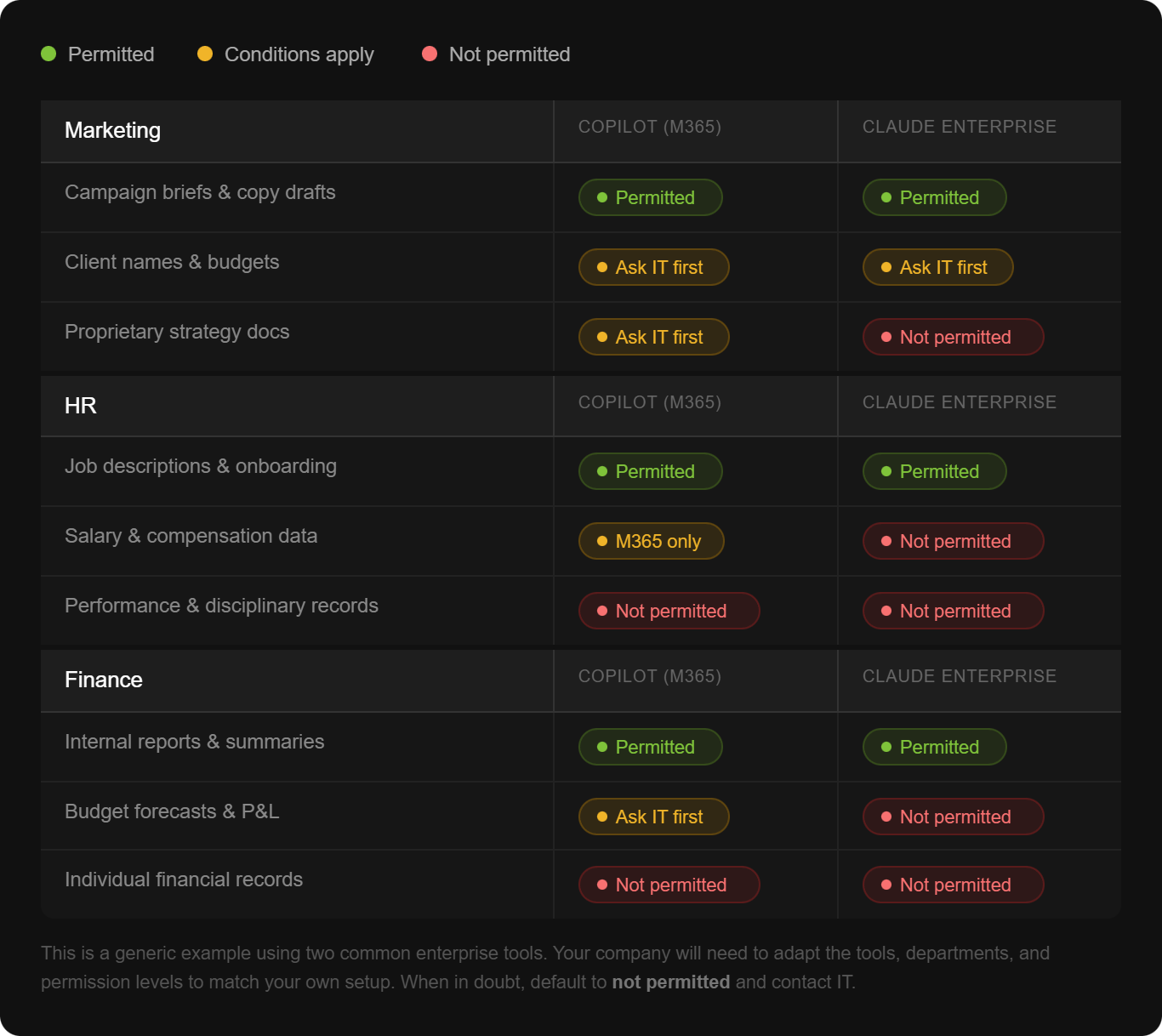
The goal is not to make the table exhaustive. It is to give employees a fast, reliable reference. Add a default rule at the bottom: when in doubt, do not share it and contact IT.
A policy is only useful if people know what they are supposed to do. This section should be written in plain language, not legal language. Four things every employee should do before using an AI tool with company data:
If an employee is using the free version of ChatGPT versus your company's enterprise deployment of Copilot, those are very different situations from a data risk standpoint. Your policy should make this explicit and discourage the use of personal, consumer-tier accounts for any work-related tasks.
Before uploading a document or pasting content into an AI tool, employees should confirm the data category. If the document came from a shared drive or contains information from a third party, they should double-check whether it falls into a restricted category.
AI tools can produce confident, well-written, and completely wrong answers. This is called a hallucination, and it happens because AI predicts likely outputs based on patterns rather than looking something up. The risk is higher when the topic involves internal data the AI was not trained on, when the prompt is vague, or when the request asks for a conclusion rather than an analysis.
To reduce that risk, employees should provide source documents as context rather than assuming the AI already knows internal information. They should ask specific questions, ask the AI to indicate where it found a piece of information, and apply their own judgment before acting on any output, especially in compliance-sensitive areas.
This sounds technical but the practical guidance is simple: be cautious when uploading documents from unknown external sources. If an AI response seems strange, off-topic, or asks for unusual actions, close the session and report it to IT. Employees should also verify any links an AI tool generates before clicking them.
A lot of AI governance happens at the admin level. Employees do not need to configure it, but they should know it exists.
This includes things like which integrations and external connectors are enabled, whether outputs can be shared externally, audit logs, and chat history settings. If a feature seems unavailable, it is likely because IT is still reviewing it. Employees do not need to find a workaround. They should wait for IT to communicate when something is ready.
This section matters because it draws a clear line: here is what IT handles, and here is what you handle. That division reduces anxiety and stops employees from making configuration decisions they are not qualified to make.
A policy without an escalation path gets ignored. Make it easy for employees to ask before they do something they are unsure about. Common situations where employees should contact IT before proceeding:
Include the actual contact. An email address or Slack channel. If you leave it as a placeholder, it stays a placeholder.
A policy written once and filed away is not a policy. AI capabilities are changing fast, which means your guidelines will need updating.
A quarterly review is a reasonable cadence for most companies right now. Each review should check whether the approved tool list is still current, whether any new data categories need to be addressed, and whether there are department-specific guidelines worth adding (HR, Finance, and Legal often have different needs).
When you update the policy, communicate the change. A short email or Slack message explaining what changed and why is enough.
Getting the document done is achievable in a day. The harder part is making sure employees actually read it, understand it, and apply it in their daily work.
That is where training comes in. A policy tells people the rules. Training helps them understand why the rules exist and how to make good decisions in situations the policy did not anticipate. Employees who understand how AI tools work, including how hallucinations happen and why certain data is sensitive, make better calls on their own.
At AI Academy, we work with companies to build exactly that kind of practical AI literacy across entire teams, not just individuals.
If you are rolling out an AI use policy, training is what makes it stick. Our corporate training programs are built for organizations that want their people to use AI confidently and correctly from day one. We cover everything from how AI tools work to how to apply them responsibly in real work contexts, tailored to your industry and team.
Ready to pair your policy with a training program that actually changes how your team works?
Get in touch to learn more about AI Academy Corporate Training.
Do we need a lawyer to write an AI use policy?
Not necessarily to get started. A practical internal document covering approved tools, data classification, and user responsibilities is something IT, HR, or a senior manager can draft. You may want legal review before formalizing it, particularly if you operate in a regulated industry.
How do we decide which AI tools to approve?
Start with what employees are already using or asking about. Evaluate each tool on three things: what data it processes and where it stores it, whether an enterprise version with stronger data protections is available, and whether it integrates with your existing environment. When in doubt, start with fewer tools and expand.
What if employees keep using unapproved tools anyway?
A policy helps, but enforcement matters too. Make the approved tools easy to access and genuinely useful. If the approved option is harder to use than the free alternative, employees will default to the free alternative. Training also helps people understand the risk, which changes behavior more reliably than rules alone.
How detailed should the data classification table be?
Detailed enough to cover your most common scenarios, simple enough to check in under 30 seconds. If employees have to read three paragraphs to decide whether something is permitted, the table is too complex. Aim for categories, not individual document types.
What is a hallucination and why does it matter for our policy?
A hallucination is when an AI tool produces confident but incorrect information. It matters for your policy because employees who do not know this happens may act on AI output without verifying it. Your policy should explicitly state that AI outputs must be reviewed before being used in decisions, especially in finance, HR, or compliance contexts.
How often should we update the policy?
Quarterly is a reasonable starting point given how quickly AI tools are changing. At minimum, review it whenever a major new tool or feature becomes available, or when a significant incident occurs.
Should we create department-specific guidelines?
Yes, eventually. A single company-wide policy is the right starting point. Once that is in place, departments with specific needs (HR handling performance data, Finance handling pricing structures) benefit from their own addendum covering their particular data categories and workflows.
How do we get employees to actually follow the policy?
Write it in plain language, keep it short, and pair it with training. A policy that explains the reasoning behind each rule gets followed more consistently than one that just lists restrictions. Regular refreshers, particularly when the policy updates, also help.


.png)
.png)